Sprint 2

Artikel ini dibuat sebagai refleksi Sprint 2 Proyek Kelas mata kuliah PMPL (Penjaminan Mutu Perangkat Lunak) di Fakultas Ilmu Komputer Universitas Indonesia.

Introduction

Pada mata kuliah PMPL, kami diminta untuk mengerjakan satu proyek kelas. Proyek kelas dikerjakan secara ‘keroyokan’ dengan tujuan untuk meningkatkan kompetensi mahasiswa dalam mengembangkan aplikasi. Di sini, kita diberi kebebasan untuk menambahkan suatu fitur, atau memperbaiki aplikasi baik itu dari segi fitur, maupun kualitas kode.

Setiap peserta diberikan kesempatan untuk mengusulkan apa yang ia ingin lakukan kepada aplikasi tersebut. Usul tersebut akan diproses, kemudian jika usul tersebut diterima, akan diubah menjadi issue. Setelah itu, akan diberikan beberapa sprint bagi peserta untuk mengimplementasikan fitur-fitur yang diusulkannya, yang di-assign ke mereka.

Beberapa fitur bisa saja diusulkan oleh beberapa mahasiswa. Oleh karena itu, issue tersebut entah dapat dikerjakan bersama, atau dikerjakan sendiri oleh mahasiswa yang pertama kali meng-assign issue tersebut ke mereka. Ini tentu berbeda per issue.

Apa yang dimaksud dengan Proyek Kelas disini?

Proyek kelas yang dimaksud adalah Digipus. Menurut deskripsi pada Repository:

Digipus is a system application that can accommodate archiving educational material from regional apparatus, academics, and practitioners, and organizing it properly so that it becomes material for increasing knowledge and skills for the community at large.

There are three personas here, Admin, Contributor, and User (General Public). As admins, they monitor contributors and material uploaded by contributors by rejecting or approving uploaded material. As contributors, they can upload a material. And as a user, they can look at the material uploaded by contributor.

Proyek ini merupakan proyek hibah dari mata kuliah PPL (Proyek Perangkat Lunak), tetapi yang unik dari proyek ini adalah fakta bahwa proyek ini merupakan proyek yang belum terselesaikan pada masa development sesuai dengan ketentuan pada mata kuliah PPL.

Pengalaman pada Sprint 2

Pada sprint 2, saya dipertemukan dengan situasi dimana kode terbaru master merupakan kode yang gagal pada saat eksekusi pada pipeline. Oleh karena itu, setelah saya pull, saya harus me-reset hard terlebih dahulu ke commit terbaru yang tidak gagal eksekusi pada pipeline. Selain itu, saya juga melaporkan hal ini kepada asdos agar dapat menyampaikan hal tersebut ke orang yang melakukan merging terakhir yang tidak lolos pipeline.

Apakah fitur yang saya kerjakan pada Sprint 2?

Fitur yang saya kerjakan pada sprint 2 adalah User Guide. User guide ini berisi panduan yang berisi fitur apa saja yang ada pada saat pembuatan user guide beserta cara menggunakannya. Fitur-fitur yang saya gunakan merupakan apa yang telah ada pada README.md, dan tidak meng-include feature yang sedang in development oleh rekan-rekan sekelas PMPL (meski dapat dengan mudah ditambahkan karena sifat modular kode yang saya buat).

Seperti biasa, karena ini menyangkut tampilan, saya membuat desainnya terlebih dahulu.

Perbedaan dari fitur ini dengan fitur yang saya buat pada Sprint 1 adalah fakta bahwa fitur ini memiliki logika backend yang baru saja saya pelajari dari buku Testing Goat, yaitu fitur metode Views yang memiliki dua return tergantung request yang datang merupakan request POST atau bukan. Logika ini harus dites dan berikut adalah cara saya membuat testnya yang tentu dilakukan sebelum membuat ‘actual code’ yang menyelesaikan issuenya.

Test yang pertama, merupakan test apakah html yang di-return adalah benar. Test ini saya rasa cukup untuk memastikan template yang di-load adalah benar, sekaligus dengan CSSnya jika telah ditempatkan pada tempat yang benar. Saya tidak mau terlalu berat untuk testing UI mengingat komplain sebelumnya jika harus mendownload geckodriver dan Firefox.

Logika saya menggunakan state variable, dimana jika statenya berubah akan menampilkan panduan yang sesuai untuk fitur yang bersangkutan. Oleh karena itu, saya memiliki empat test. Khusus untuk test state variable is int, itu dilakukan untuk membunuh mutan state yang dikirimkan berupa string. Angka minus bisa saja digunakan untuk state di masa depan, jadi tidak saya hilangkan terlebih dahulu.

Setelah menulis test-test tersebut, barulah saya membuat ‘actual code’nya. Berikut adalah snippet dari apa yang saya tulis.

Dapat dilihat ada if untuk state-statenya, yang memiliki korespondensi dengan state yang dikirim ketika tombol-tombol yang merepresentasikan fitur diklik.

Berikut adalah kode CSS custom (menimpa CSS bawaan dari base) untuk mengubah tampilan

Selain itu, saya menambahkan link ke Navigation Bar dan Home Page. Saya merasa untuk penambahan konten secara sederhana tersebut tidak baik untuk dites, sehingga saya tidak melakukannya.

Berikut adalah hasil akhir dari apa yang saya kerjakan:

Dapat dilihat bahwa desainnya sangat mirip, hanya saja sedikit berbeda karena ada navigation bar diatas yang berasal dari import oleh base.html. Adanya navigation bar diatas membuat saya bisa menghilangkan “back to homepage” link yang ada pada desain awal.

Penutup

Saya jauh lebih terbiasa dengan workflow secara keseluruhan pada sprint ini ketimbang sprint sebelumnya, sehingga tidak ada kesulitan bagi saya dari segi workflow untuk mengimplementasikan fiturnya. Hal ini membantu saya agar saya bisa lebih fokus dalam mengembangkan fitur yang telah di-assign kepada saya.

Tentu kesalahan tidak akan pernah luput dari setiap orang. Kesalahan yang saya temukan pada sprint ini terletak pada commit rekan sekelas yang tidak lulus pipeline yang saya telah jelaskan sebelumnya. Ini merupakan minor setback yang saya hadapi, dan saya beruntung saya memiliki pengetahuan untuk mem-bypass masalah ini sehingga saya bisa melanjutkan proses development secepatnya.

Sprint 1

Artikel ini dibuat sebagai refleksi Sprint 1 Proyek Kelas mata kuliah PMPL (Penjaminan Mutu Perangkat Lunak) di Fakultas Ilmu Komputer Universitas Indonesia.

Introduction

Pada mata kuliah PMPL, kami diminta untuk mengerjakan satu proyek kelas. Proyek kelas dikerjakan secara ‘keroyokan’ dengan tujuan untuk meningkatkan kompetensi mahasiswa dalam mengembangkan aplikasi. Di sini, kita diberi kebebasan untuk menambahkan suatu fitur, atau memperbaiki aplikasi baik itu dari segi fitur, maupun kualitas kode.

Setiap peserta diberikan kesempatan untuk mengusulkan apa yang ia ingin lakukan kepada aplikasi tersebut. Usul tersebut akan diproses, kemudian jika usul tersebut diterima, akan diubah menjadi issue. Setelah itu, akan diberikan beberapa sprint bagi peserta untuk mengimplementasikan fitur-fitur yang diusulkannya, yang di-assign ke mereka.

Beberapa fitur bisa saja diusulkan oleh beberapa mahasiswa. Oleh karena itu, issue tersebut entah dapat dikerjakan bersama, atau dikerjakan sendiri oleh mahasiswa yang pertama kali meng-assign issue tersebut ke mereka. Ini tentu berbeda per issue.

Apa yang dimaksud dengan Proyek Kelas disini?

Proyek kelas yang dimaksud adalah Digipus. Menurut deskripsi pada Repository:

Digipus is a system application that can accommodate archiving educational material from regional apparatus, academics, and practitioners, and organizing it properly so that it becomes material for increasing knowledge and skills for the community at large.

There are three personas here, Admin, Contributor, and User (General Public). As admins, they monitor contributors and material uploaded by contributors by rejecting or approving uploaded material. As contributors, they can upload a material. And as a user, they can look at the material uploaded by contributor.

Proyek ini merupakan proyek hibah dari mata kuliah PPL (Proyek Perangkat Lunak), tetapi yang unik dari proyek ini adalah fakta bahwa proyek ini merupakan proyek yang belum terselesaikan pada masa development sesuai dengan ketentuan pada mata kuliah PPL.

Pengalaman pada Sprint 1

Pengalaman saya saat melakukan sprint 1 unik, karena saya banyak melakukan kesalahan baik itu dalam merging kode, dan penulisan kode. Pada saat merging kode, saya mengira bahwa GitLab akan mem-point ke repository yang benar. Tetapi saat saya ingin merge, ternyata saya tidak memiliki izin untuk merge. Setelah saya telusuri kembali, ternyata setting otomatis GitLab mem-point ke repository PPL yang merupakan sumber forking bagi repository proyek kelas PMPL. Oleh karena itu, saya harus membuat merge request baru untuk merging ke repository yang benar.

Pada pengerjaan fitur saya, saya mengimplementasikan Functional Test. Ada satu rekan yang concerned dengan running time Functional Test saya, karena sebelum dijalankan, harus mendownload geckodriver dan Firefox, yang membutuhkan waktu yang lama. Ini mempengaruhi waktu eksekusi pipeline, sehingga mau tidak mau harus di-disable oleh rekan tersebut. Karena rekan tersebut mengontak saya sebelum mendisablenya, saya oke-oke saja terhadap hal tersebut.

Apakah fitur yang saya kerjakan pada Sprint 1?

Fitur yang saya kerjakan pada Sprint 1 sangat sederhana, yaitu name banner. Name banner adalah Navigation bar yang hanya menampilkan tulisan “Digipus”. Alasan mengapa saya mengerjakan fitur yang sangat sederhana adalah karena ini merupakan salah satu fitur yang diterima dari beberapa fitur yang saya usulkan.

Sekadar latar belakang, fitur yang saya usulkan ada 3, dengan tingkat kesulitan mudah ke sedang. Alasan kenapa saya mengusulkan fitur yang mudah untuk diimplementasi adalah karena saya merasa ada hal lebih yang saya harus lakukan (mengingat ini adalah tugas mata kuliah PMPL, bukan PPL), bukan hanya sekadar implementasi saja.

Impelementasi Fitur

Lanjut ke fitur yang saya kerjakan. Karena fitur tersebut merupakan fitur yang UI-based, maka saya harus membuat desain terlebih dahulu, yang kemudian saya posting ke halaman issue.

Untuk name banner, saya memiliki dua desain awal:

Anehnya tidak ada yang melihat desain saya. Oleh karena itu, saya melanjutkan development fitur yang saya usulkan.

Selanjutnya adalah implementasi fitur. Dalam implementasi fitur dalam bentuk kode, saya menggunakan TDD. Tetapi biasanya UI tidak dites. Oleh karena itu, saya hanya menaruh tes sederhana yang memastikan bahwa Name Banner di-load secara sempurna ke laman.

Setelah itu, barulah saya mengimplementasi ‘actual code’ untuk menyelesaikan fitur yang saya kerjakan:

Berikut adalah hasil akhirnya:

Pada akhirnya, saya memutuskan untuk menggabungkan hal-hal yang saya sukai dari kedua desain yang saya buat (Size dari desain 1, dan warna putih serta kesederhanaan tampilan dari desain 2).

Penutup

Pengerjaan proyek secara ‘keroyokan’ merupakan suatu hal yang baru bagi saya. Sebelumnya, segala fitur dalam suatu aplikasi hanya dikerjakan oleh saya dan rekan-rekan anggota tim saya. Ini tentu memberikan ‘challenge’ yang unik, yaitu komunikasi yang hanya sebatas perlu saja (jika tidak ada fitur yang overlap maka tidak akan ada komunikasi antar rekan), dan perlunya menulis kode dengan standar yang tinggi agar dapat dimengerti oleh rekan lain dan juga untuk mempengaruhi fitur yang ada sesedikit mungkin agar jika rekan lain ingin melakukan merging tidak menyulitkan mereka.

My Current Goals

Before 30, before 10,000 hours played in Dota 2, I want to reach Immortal Rank.

Before 30, I want to be able to digital paint well, to the point where I can draw something that is at least art book quality. Anime style first because it is easiest, then Dota 2/League of Legends style.

Before my Algoexpert Subscription ends on April 2021, I want to be able to answer 100 algorithm questions with ease and all system design questions with ease, as well as finish all the assessments.

When I graduate, I want to get a job that is above 10 mio in take home pay, with good compensation packages (insurance, etc.)

This month, I want to reach 5600 rank in Clash Royale. When I have constructed a deck which consists of all level 13 cards, I want to be able to reach at least 6000 in a month.

Before October 19, which is probably when the battle pass ends, and possibly when the rank reset I want to reach Legend Rank.

This semester, I want to get at least an A- in 4 subjects and no Cs.

Before the end of this year, I want to upgrade my fashion wardrobe with an allocation of 4 mio.

Refactoring

mf-dallas“Whenever I have to think to understand what the code is doing, I ask myself if I can refactor the code to make that understanding more immediately apparent.”
― Martin Fowler, Refactoring: Improving the Design of Existing Code

Pada awal pengembangan aplikasi baru, biasanya anda hanya berfokus untuk membuat minimum viable app secepat mungkin. Kemudian seiring berjalannya waktu, anda ingin menambahkan fungsionalitas ke aplikasi anda. Mungkin pada awalnya kodenya tidak bercela, tetapi ketika fungsionalitasnya ditambah secara terus menerus, dan baris kode yang anda buat meningkat, maka bisa saja kode anda menjadi berantakan. Telltale sign dari ini adalah ketika anda membuka kode anda, anda tidak dapat mengerti apa yang anda tulis.

Kode berantakan ini dapat di deteksi dengan cepat dengan melihat apakah kode itu memiliki Code Smell, dan ini didokumentasikan secara ekstensif di buku Refactoring: improving the design of existing code yang dibuat oleh Martin Fowler. Beberapa dari code smell adalah:

  • Duplicated code: Kode yang sama digunakan di beberapa komponen yang berbeda.
  • Long Method: Metode yang panjang
  • Large Classes: Kelas yang memiliki fungsionalitas terlalu banyak
  • Long Parameter List: Metode yang untuk dieksekusi butuh banyak sekali parameter untuk dimasukkan kedalamnya
  • Comments: Tidak semua komentar itu buruk, hanya komentar yang digunakan untuk menjelaskan kode yang buruk.

Setelah mengetahui adanya Code Smell, maka anda harus membetulkannya. Saya akan memberikan salah satu contoh dari apa yang saya lakukan untuk membetulkan kode saya.

Extract Class

Pernahkah anda membuat komponen yang terlalu banyak barisnya pada render methodnya? Mungkin anda dapat mengekstraksinya menjadi beberapa komponen kecil.

Perhatikan snippet kode dibawah ini.

UploadFormPage.jsx

import React from 'react';
import UploadForm from './UploadForm';

/**
 * The entire form page. Consists of the two forms and a send button.
 */
class UploadFormPage extends React.Component {
    constructor(props) {
        super(props);
        this.schedule = React.createRef();
        this.rooms = React.createRef();
        this.submit = this.submit.bind(this);
        this.state = {
            buttonText: "Berikutnya"
        }
    }

    async submit() {
        this.setState({buttonText: "Mengupload..."})
        const schedIsValid = this.schedule.current.validateFile();
        const roomsIsValid = this.rooms.current.validateFile();

        if (schedIsValid && roomsIsValid) {
            await this.schedule.current.sendFile();            
            await this.rooms.current.sendFile();
            this.props.setState();
        }
    }
    render() {
        return <>
        <Container>
            <Row>
                <Col className={this.props.result === true ? 'inactive' : ''}>
                <button className="btn-circle" disabled>&nbsp;&nbsp;1&nbsp;&nbsp;</button>
                <h3 className="text-brown">Input dan Konfigurasi</h3>
                </Col>
                <Col className={this.props.result === false ? 'inactive' : ''}>
                <button className="btn-circle" disabled>&nbsp;&nbsp;2&nbsp;&nbsp;</button>
                <h3 className="text-brown">Output</h3>
                </Col>
            </Row>
        </Container>
        <div className="container bg-white h-75">
            <UploadForm
                apiUrl={this.props.schedulePostUrl}
                htmlFor="jadwal"
                label="jadwal kuliah"
                ref={this.schedule}
            />
            <br/>
            <UploadForm
                apiUrl={this.props.roomsPostUrl}
                htmlFor="ruang"
                label="ruang ujian"
                ref={this.rooms}
            />

            <div className="text-right p-3">
                <button className="btn btn-lg btn-primary" onClick={this.submit}>
                    {this.state.buttonText}
                </button>
            </div>
        </div>
        </>
    }
}

export default UploadFormPage;

SettingComponent.jsx

import React from 'react';
import RentangTanggalUjianComponent from '../date_range_input/rentangTanggalUjianComponent';
import JumlahSesiPerHariComponent from './JumlahSesiPerHariComponent.jsx';
import PilihTanggalUjianComponent from './PilihTanggalUjianComponent.jsx';
import SendButtonComponent from './SendButtonComponent'
import JumlahTanggalComponent from './JumlahTanggalComponent';

class SettingComponent extends React.Component {
    constructor(props) {
        super(props);
        this.state = {
            dateRange: [new Date(2020, 6, 2), new Date(2020, 6, 10)],
            isPilihTanggalUjianComponentVisible: false,
            dateCount: 0,
            sessionPerDay: 1
        };
        this.dateComponent = React.createRef();
        this.sessionPerDayComponent = React.createRef();
    }

    setDateRange(startDate, endDate) {
        this.setState({
            dateRange: [new Date(startDate.valueOf()), new Date(endDate.valueOf())]
        });
    }

    setSessionPerDay(spd) {
        this.setState({
            sessionPerDay: spd
        });
    }

    componentDidMount() {
        this.setDateRange(new Date(2020, 6, 2), new Date(2020, 6, 10))
    }

    setIsPilihTanggalUjianComponentVisible(isVisible) {
        this.setState({
            dateCount: 0,
            isPilihTanggalUjianComponentVisible: isVisible
        });
    }

    submit() {
        const dates = this.dateComponent.current.state.dates_enabled;
        this.props.setState(dates, this.state.sessionPerDay);
    }

    setCount(delta) {
        this.setState({
            dateCount: this.state.dateCount + delta
        })
    }

    render() {
        return <>
        <Container>
            <Row>
                <Col className={this.props.result === true ? 'inactive' : ''}>
                <button className="btn-circle" disabled>&nbsp;&nbsp;1&nbsp;&nbsp;</button>
                <h3 className="text-brown">Input dan Konfigurasi</h3>
                </Col>
                <Col className={this.props.result === false ? 'inactive' : ''}>
                <button className="btn-circle" disabled>&nbsp;&nbsp;2&nbsp;&nbsp;</button>
                <h3 className="text-brown">Output</h3>
                </Col>
            </Row>
        </Container>
        <div className="container bg-white min-h-75">
            <RentangTanggalUjianComponent
                setVisibility={this.setIsPilihTanggalUjianComponentVisible.bind(this)}
                setDateRange={this.setDateRange.bind(this)}
            />
            <br />
            <JumlahSesiPerHariComponent
                update={this.setSessionPerDay.bind(this)}
            />
            <br />
            <PilihTanggalUjianComponent
                dateRange={this.state.dateRange}
                visible={this.state.isPilihTanggalUjianComponentVisible}
                setGeneratedDates={this.setGeneratedDates}
                ref={this.dateComponent}
                setCount={this.setCount.bind(this)} />
            <JumlahTanggalComponent
                count={this.state.dateCount}
            />
            <SendButtonComponent
                visible={this.state.isPilihTanggalUjianComponentVisible}
                submit={this.submit.bind(this)} />
        </div>
        </>
    }
}

export default SettingComponent;

Jika anda lihat, anda dapat menemukan kode yang diulang lebih dari sekali, yaitu:

<Container>
            <Row>
                <Col className={this.props.result === true ? 'inactive' : ''}>
                <button className="btn-circle" disabled>&nbsp;&nbsp;1&nbsp;&nbsp;</button>
                <h3 className="text-brown">Input dan Konfigurasi</h3>
                </Col>
                <Col className={this.props.result === false ? 'inactive' : ''}>
                <button className="btn-circle" disabled>&nbsp;&nbsp;2&nbsp;&nbsp;</button>
                <h3 className="text-brown">Output</h3>
                </Col>
            </Row>
        </Container>
Seperti anda tahu, duplicate code merupakan Code Smell. Jadi ketika anda menemukan hal ini, tanyakan kepada diri anda, apakah ada suatu hal yang dapat digunakan? Kita dapat mengeluarkannya dan membuat komponen baru dari itu. Komponen yang dibuat dapat menjadi seperti ini:
import React from 'react';
import './PointerComponent.css';
import Container from 'react-bootstrap/Container';
import Row from 'react-bootstrap/Row';
import Col from 'react-bootstrap/Col';

class PointerComponent extends React.Component {
    render() {
        return <Container>
            <Row>
                <Col className={this.props.result === true ? 'inactive' : ''}>
                <button className="btn-circle" disabled>&nbsp;&nbsp;1&nbsp;&nbsp;</button>
                <h3 className="text-brown">Input dan Konfigurasi</h3>
                </Col>
                <Col className={this.props.result === false ? 'inactive' : ''}>
                <button className="btn-circle" disabled>&nbsp;&nbsp;2&nbsp;&nbsp;</button>
                <h3 className="text-brown">Output</h3>
                </Col>
            </Row>
        </Container>
    }
}

export default PointerComponent;

Dengan ini, refactoring selesai dan tidak ada lagi code smell pada kedua file tersebut.

Dengan frekuensi refactoring yang meningkat seiring meningkatnya fungsionalitas, mungkin anda berpikir bahwa refactoring adalah waste of time. Mungkin anda memiliki intensi untuk membuat software yang sempurna terlebih dahulu agar anda bisa men-shave off waktu yang dibutuhkan untuk melakukan refactoring. Tetapi anda tidak bisa lebih salah lagi.

Dari pengalaman saya, saya rasa tidak ada yang bisa menulis kode yang sempurna pada penulisan yang pertama kali. Entah karena tidak memiliki pengalaman dalam menggunakan suatu framework tertentu, entah karena time constraints yang sangat ketat sehingga fitur harus di-develop sesegera mungkin, entah karena alasan lain yang tidak saya sebutkan (saya hanya menyebutkan apa yang saya alami). Dengan berpikir untuk men-develop suatu aplikasi yang sempurna dengan kode yang sempurna di awal, anda pasti akan menghabiskan waktu untuk memikirkan cara menyempurnakan fitur tersebut dibandingkan men-deliver appnya dengan fitur yang sesuai dengan keinginan anda.

Oleh karena itu, meski refactoring adalah suatu hal yang inevitable, anda jangan menghindarinya. Refactoring bukanlah suatu hal yang perlu ditakuti, melainkan harus di embrace, karena itu merupakan bagian yang sangat integral pada proses software development.

Single User, Simple Profiling, and Optimizing Code

Apa itu Profiling?

Ketika kita membuat perangkat lunak apapun, atau dalam kasus saya aplikasi web, kita harus menganalisa performa dari perangkat lunak agar dapat mengetahui seberapa baik aplikasi kita berjalan dan mencari tahu apakah ada masalah dalam performa yang dapat diperbaiki sehingga aplikasi dapat berjalan sebaik mungkin.

The perfect app

Setiap developer secara jelas menginginkan aplikasinya untuk berjalan sebaik mungkin dan dalam kasus aplikasi web, salah satu metric performa untuk performa adalah load time. Saya ingin mengarahkan mata Anda ke kutipan di bawah ini untuk mengetahui seberapa pentingnya performa yang baik dalam suatu aplikasi.

A Bing study found that a 10ms increase in page load time costs the site $250K in revenue annually. – Rob Trace and David Walp, Senior Program Managers at Microsoft

Mungkin anda bingung mengapa selisih 10 ms akan sangat berpengaruh terhadap pendapatan suatu perusahaan per tahun karena 10 ms merupakan waktu yang sangat singkat, tetapi katakan kita membuat situs yang melibatkan banyak transaksi, dan setiap transaksi membutuhkan waktu 100 ms, aplikasi tersebut kira kira dapat melakukan 864000 transaksi per hari . Ketika kita menambahkan 10 ms ke waktu eksekusi untuk transaksi tersebut menjadi 110 ms, kita hanya dapat melakukan 785454 transaksi per hari. Katakan setiap transaksi kita mendapatkan 0.01 US Dollar, ini berarti kita akan kehilangan 595.46 US Dollar per hari. Jika kita kalikan dengan 365 berarti kita akan kehilangan 217342.9 US Dollar per tahun. Jika untuk setiap transaksi kita mendapatkan sedikit lebih banyak uang (sekitar 15 persen) maka dapat dengan jelas kita ketahui mengapa peningkatan page load time dapat mengurangi $250K dari pendapatan suatu perusahaan per tahun. Oleh karena itu kita harus bekerja keras supaya aplikasi kita dapat berjalan secara instan sehingga pendapatannya akan maksimal bukan?

Salah satu masalah besar yang dapat dilakukan oleh seorang pengembang perangkat lunak adalah untuk mengkhawatirkan optimisasi segala aspek dari program mereka sehingga menghabiskan banyak waktu yang seharusnya dapat digunakan pada pengembangan fitur agar dapat dipublikasikan dengan lebih cepat. Ini merupakan kesalahan yang disebut premature optimization dan berikut adalah pendapat Donald Knuth, salah satu orang yang berkontribusi dalam mengembangkan Knuth – Morris – Pratt Algorithm:

Programmers waste enormous amounts of time thinking about, or worrying about, the speed of noncritical parts of their programs, and these attempts at efficiency actually have a strong negative impact when debugging and maintenance are considered. We should forget about small efficiencies, say about 97% of the time: premature optimization is the root of all evil. Yet we should not pass up our opportunities in that critical 3%. – Donald Knuth

Berarti ketika ada suatu hal yang sebenarnya dapat diperbaiki, kita harus menganalisa dulu apakah hal tersebut critical. Kalau tidak, seharusnya ditinggalkan saja, atau jika dapat dilakukan secara instan atau setidaknya tanpa menghabiskan waktu yang lama, lakukan secukupnya.

Aplikasi yang digunakan untuk profiling

Saya menggunakan Chrome Devtools untuk melakukan profiling dasar. Menurut dokumentasi yang bisa diakses di link ini, Chrome DevTools adalah serangkaian perangkat yang dibangun secara langsung ke dalam aplikasi Google Chrome yang dapat digunakan untuk men-diagnosa atau mengubah suatu halaman web dengan mudah. Salah satu fitur yang paling sering digunakan mungkin adalah fitur inspect element, karena saya melihat begitu banyak meme yang dibuat dengan mengganti kata-kata pada suatu situs tertentu. Untuk mengakses Chrome DevTools, anda dapat membukanya dengan meng-klik kanan dan mengklik inspect, atau menekan Control+Shift+C pada Windows (untuk OS lain dapat dilihat pada dokumentasi yang dapat diakses pada tautan ini).

Dalam ini, ada banyak sekali tab yang dapat kita pakai. Ada Device Mode, yang biasa digunakan Front End Developer untuk mengubah tampilan sehingga seakan-akan ditampilkan pada perangkat mobile, Elements Panel dimana fitur untuk mengganti DOM dan CSS dapat ditemukan, Console Panel dimana kita dapat melihat log console (saya, dan saya yakin, banyak developer menggunakan fitur ini untuk menguji fitur aplikasi web yang dibuat dengan command console.log), ataupun mengevaluasi nilai suatu variabel dengan menginput nama variabel tersebut dalam consolenya (akan direturn nilainya jika variabel tersebut tidak bersifat private),  Sources Panel yang seharusnya digunakan untuk melakukan debugging javascript, Network Panel yang digunakan untuk mendebug aktivitas network, Performance Panel yang digunakan untuk mengukur dan mencari masalah dalam performa, Memory Panel, yang digunakan untuk mencari memory leak jika ada, Application Panel, yang digunakan untuk mencari resource yang di-load, dan Security Panel untuk menganalisa isu yang berhubungan dengan Security.

Hasil Profiling

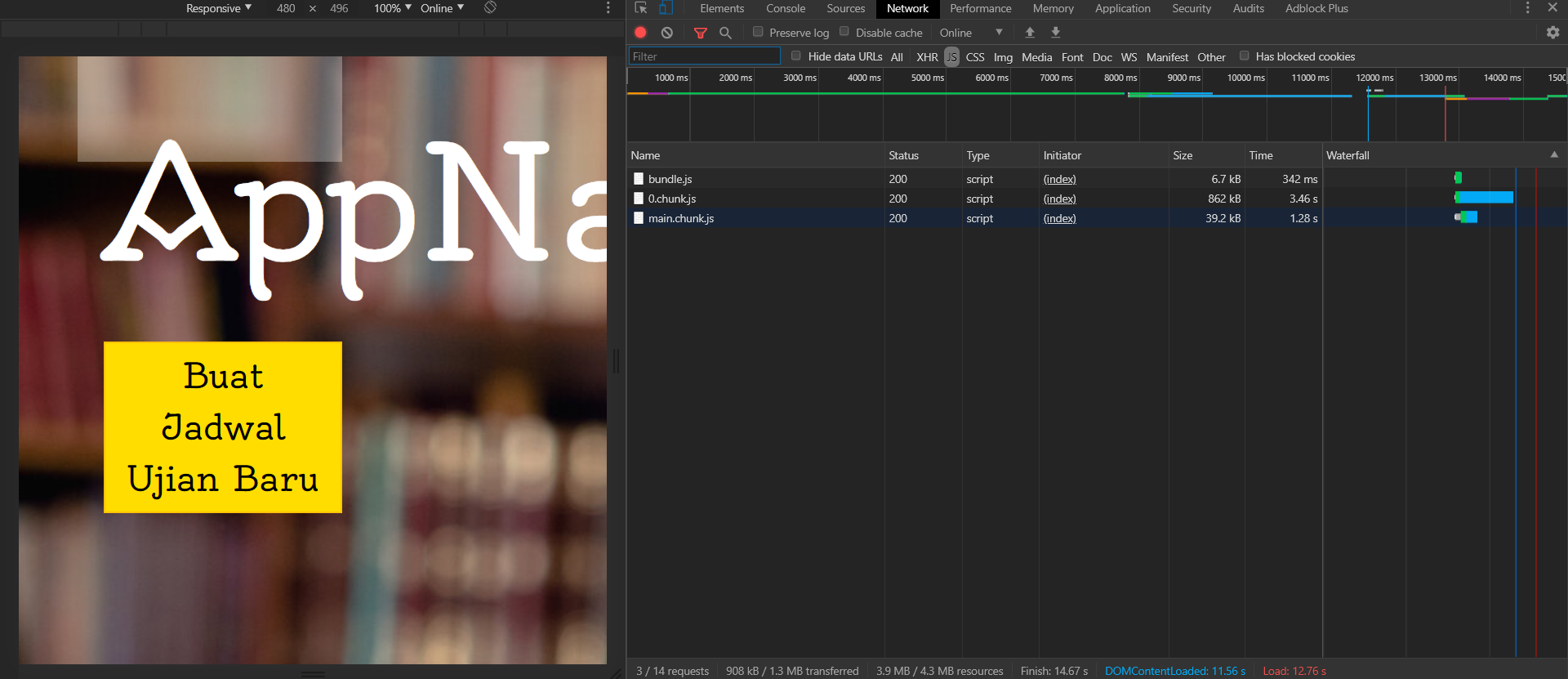
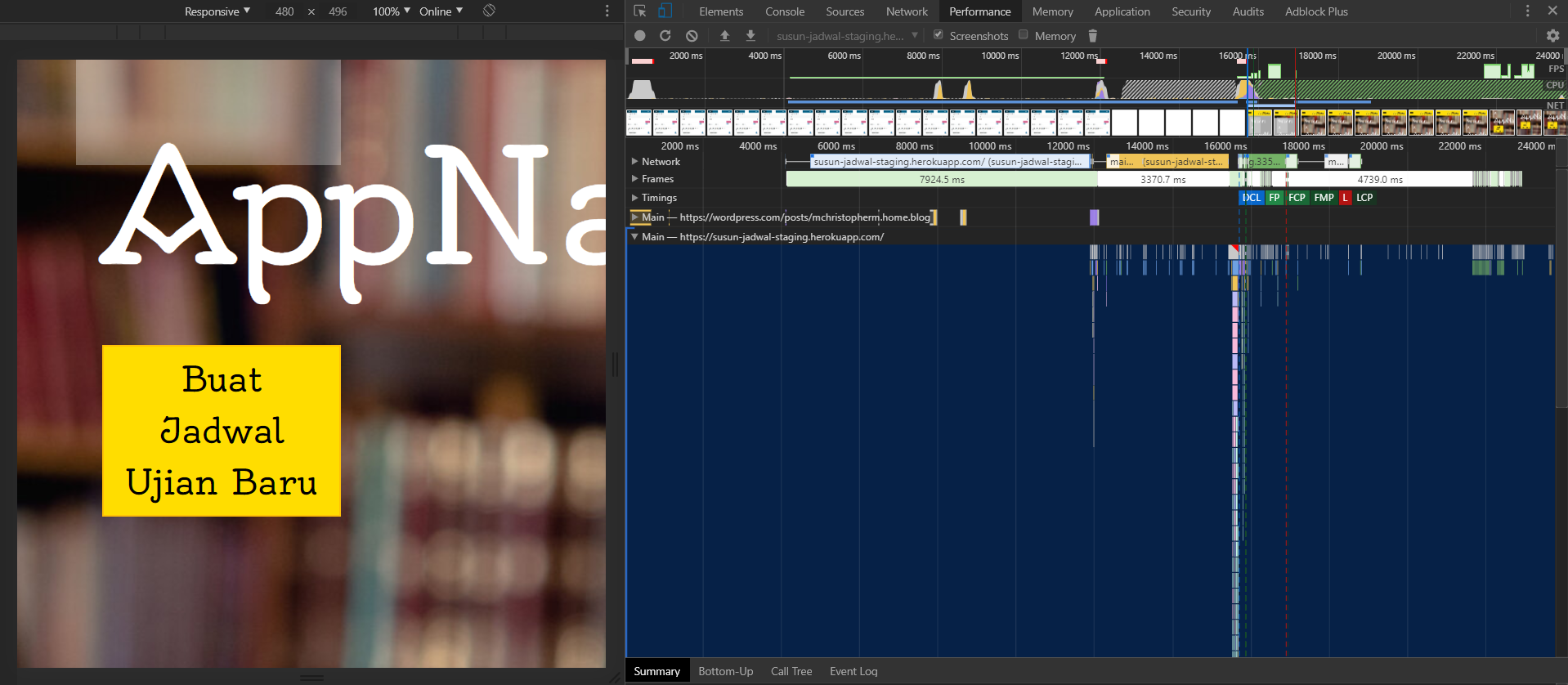
Untuk kasus ini, saya menggunakan Chrome DevTools untuk mengetahui seberapa lama home page aplikasi saya dapat ter-load. Karena aplikasi kami hanya ada satu tipe user saja (tautan akan mengarah ke blog post tentang persona), dan karena saya meminta agar situs tidak diakses oleh orang lain terlebih dahulu sebelum profiling, kami pasti hanya akan menguji performa aplikasi untuk satu pengguna saja, untuk satu tipe user. Panel yang akan saya pakai adalah Performance dan Network. Berikut adalah tampilan hasilnya

Performancep3.png

NetworkNetwork.png

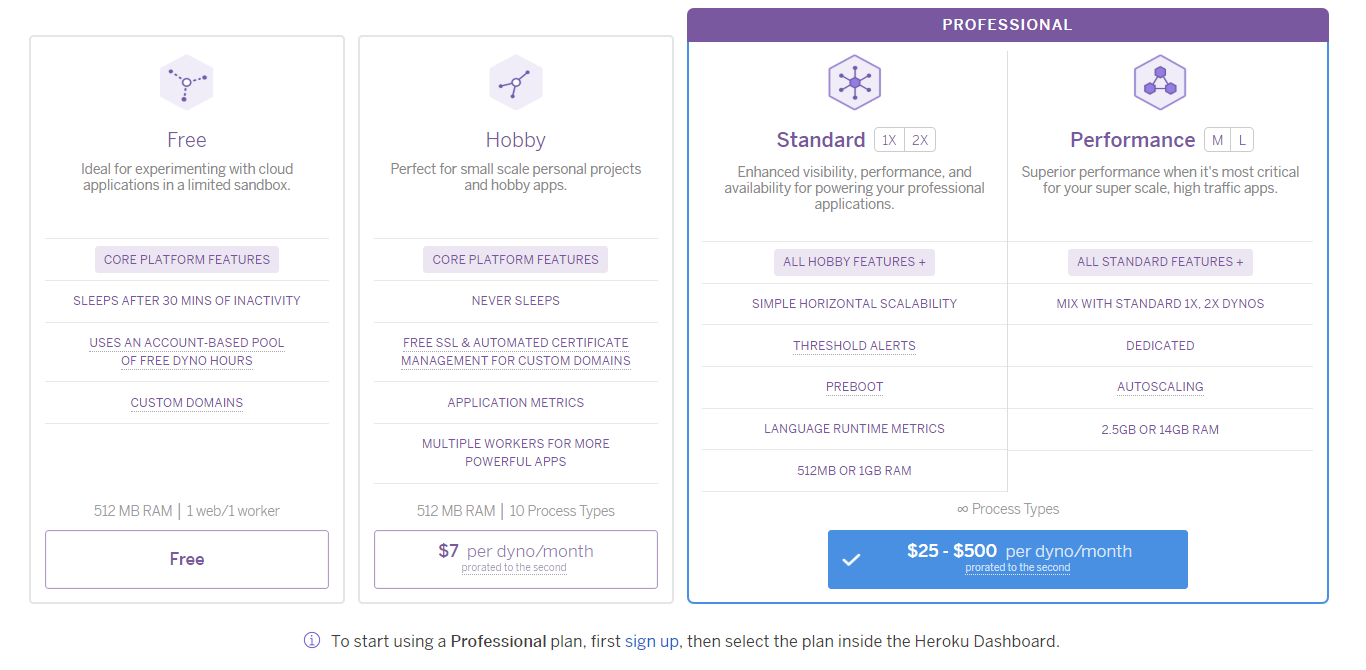
Dapat dilihat pada performance, tepatnya pada screengrab di bawah grafik bahwa aplikasi memiliki waktu loading yang sangat lama dari mulai penekanan enter pada omnibox. Saya memprediksi hal ini akan terjadi karena aplikasi kami untuk sekarang dilayani menggunakan Heroku dengan plan gratis. Dengan Plan Gratis, Dyno akan tidur setelah inaktif selama 30 menit (untuk mengetahui lebih lengkap arsitektur perangkat lunak yang kami buat, anda dapat mengakses tautan ini). 

pricing

Solusi yang saya dapat berikan untuk ini adalah untuk membeli paket Hobby dimana untuk setiap Dyno, akan dihargai sebesar 7 Dollar. Ini seharusnya cukup untuk aplikasi skala kecil yang kami buat (tautan akan menuju ke detil arsitektur perangkat lunak kami). Anda dapat melihat dibawah bahwa ketika situs dicoba untuk dijalankan kembali, maka loading akan terjadi dengan sangat cepat.

p4

performance

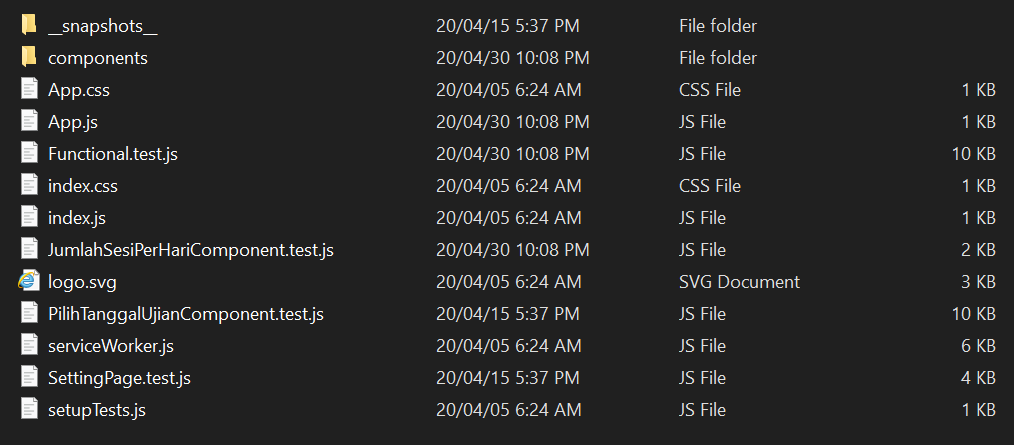
Pada Tab Network, dapat dilihat bahwa terdapat sedikit sekali javascript yang di-load. Padahal, ketika kita lihat folder src dari aplikasinya saja dapat dilihat bahwa terdapat banyak sekali file javascript.

src

Hal ini disebabkan oleh fitur Build yang tersedia pada React Scripts yang tersedia jika anda menggunakan Create React App, sebuah perangkat lunak yang direkomendasikan untuk digunakan untuk membangun aplikasi satu laman berbasis React, untuk membangun aplikasi satu laman anda (anda dapat mengakses situsnya dengan mengklik tautan ini). Fitur ini akan meminimalkan file Javascript yang dibutuhkan dan membaginya dalam beberapa chunk yang akan di-load sesuai kebutuhan. Untuk selengkapnya dapat anda dapat mengklik tautan ini untuk mengunjungi laman dokumentasi React Scripts yang tersedia.

Menggunakan React Profiler

Permasalahannya di atas adalah pengaksesan yang lambat ke aplikasi, dan argumentasi yang saya berikan adalah bahwa aplikasi tersebut berjalan dengan lambat bukan karena konfigurasi aplikasi kami yang tidak teroptimisasi dengan baik, tetapi karena Heroku harus “membangunkan” dyno-nya terlebih dahulu sebelum kami dapat mengakses halaman splash page. Mari kita coba menggunakan React Profiler untuk memastikan bahwa kesalahan terletak pada Heroku dan bukan kami.

Untuk menggunakan React Profiler pada browser Chrome, anda dapat pergi ke Chrome Webstore dan mencari React Developer Tools.

0

Dengan penambahan React Developer Tools, akan ada dua tab tambahan, yaitu Components dimana kita bisa melihat components yang digunakan untuk melakukan konstruksi halaman tersebut, dan Profiler dimana performa aplikasi berbasis react dapat diukur.

React Developer Tools sebagai ekstensi memiliki fitur dimana pengguna akan menentukan apakah sebuah halaman dibuat menggunakan React. Jika tidak, maka anda dapat melihat tanda di sebelah omnibox yang akan terlihat seperti ini 0.0.0.1. Kalau ya, maka anda dapat melihat tanda di sebelah omnibox yang akan terlihat seperti ini 0.0.1.

Jika anda mengklik simbolnya, maka anda dapat melihat notifikasi bahwa halaman tersebut menggunakan react versi development, react versi production ataupun tidak menggunakan react sama sekali.

Mari kita jalankan aplikasi secara lokal agar kita dapat fokus untuk menguji aplikasi tanpa ada overhead dari proses heroku.

Components Tab1

Profiler Tab

2

Jika melihat Components dan membandingkannya dengan Profiler tab, maka dapat disimpulkan bahwa semuanya berhasil di render. Jika melihat lebih jauh lagi, dapat dilihat bahwa Profiler melihat bahwa aplikasi dijalankan selama 19.5 ms sebelum komponen diberhentikan, ada beberapa jeda untuk me-render Pagecontainer dan ada beberapa jeda juga dari mounting komponen PageContainer (yang merupakan komponen utama yang di-render) dengan mounting komponen anaknya. Total Render Time dari PageContainer adalah 18.4ms, dengan loading selama 11 ms sebelum komponen anaknya di-render yang dihabiskan untuk menjalankan konstruktor dan metode-metode yang dijalankan setelah komponen tersebut baru di-mount dan setiap kali komponen tersebut di-render, dan juga 1.1ms setelah aplikasi dijalankan untuk me-load komponen pertamanya. Tetapi apakah itu cukup baik?

Menurut Jakob Nielsen, response time dibagi tiga:

  1. Sekitar 0.1 detik untuk komponen yang interaktif agar pengguna merasa bahwa mereka benar-benar berinteraksi dengan komponen tersebut secara langsung
  2. Sekitar 1.0 detik agar tidak meng-interrupt user flow
  3. Sekitar 10 detik agar tidak meng-interrupt user attention

Karena loading ter-lama adalah 11ms / 1.1 detik, maka meski sedikit lebih tinggi dibandingkan 1 detik, itu sesuai poin kedua dimana ia seharusnya tidak meng-interrupt user flow ketika loading terjadi maksimum sekitar 1.0 detik.

Kesimpulan yang bisa ditarik disini adalah, benar fakta bahwa heroku meng-interrupt performa secara besar, dan agar performa aplikasi dapat membaik, maka saya sarankan untuk meng-upgrade plan heroku agar dyno tidak akan tidur.

Penutup

Sebenarnya masih banyak lagi hal yang dapat dilakukan untuk mem-profile aplikasi secara keseluruhan, tetapi karena yang terpikirkan oleh saya adalah user experience ketika pertama kali membuka aplikasi itu, hal inilah yang saya lakukan. Jika ada kesalahan, atau ada saran mengenai profiling yang dapat saya lakukan, anda dapat mengomentarinya di bawah atau bahkan menghubungi saya secara langsung. Terima kasih telah membaca blog post ini, dan nantikan blog post selanjutnya yang mungkin akan menjelaskan tentang user evaluation atau user acceptance test.

Sumber:

https://auth0.com/blog/12-steps-to-a-faster-web-app/

https://create-react-app.dev/docs/available-scripts/

https://www.npmjs.com/package/react-scripts

Software Architecture

Software Architecture adalah top level desain software kita secara keseluruhan. Ekspektasinya adalah untuk ditentukan dari awal, tetapi saya memberikan argumen bahwa karena fitur-fitur dapat ditambahkan atau dikurangi seiring berjalannya waktu, maka Software Architecture dapat berubah seiring berjalannya waktu. Meski begitu, Software Architecture setidaknya secara garis besar sudah harus ditentukan sebelum software dibuat.

Ketika menentukan software architecture, kita harus memikirkan terlebih dulu aplikasi seperti apa yang kita ingin buat. Aplikasi kami, SusunJadwal, merupakan aplikasi yang dibuat untuk menyusun jadwal ujian secara otomatis.

Desain awalnya adalah aplikasi dimana pengguna dapat mengupload file excel berisi ruang dan informasi detil tentang mata kuliah, dan mendapatkan hasil jadwal yang memenuhi constraint yang diatur. Jadwal tersebut kemudian dapat diunduh sebagai file xlsx. Aplikasi ini akan memproses kedua file tersebut, tetapi tidak menyimpannya di server backend setelah selesai. Aplikasi ini sebelumnya juga tidak akan menyimpan file xlsx hasil jadwal akhir. Tetapi karena client meminta fitur penyimpanan excel maka kami mengimplementasikannya. Visi kami adalah ketika pengguna meminta pembuatan jadwal, excel akan di-generate dan disimpan di cloud. Fitur men-generate file tersebut ketika pengguna mengklik tombol unduh tetap ada, agar backend tidak perlu mengirimkan request kepada firebase ketika pengguna ingin mengunduh excel file.

Mengetahui semua itu, ditambah lagi dengan prinsip bahwa kami harus memudahkan development untuk para developers (beberapa anggota kelompok kami bahkan tidak mengerti React, dan juga memitigasi ketika beberapa anggota terpaksa tidak bisa mengerjakan), kami memutuskan untuk menggunakan React dalam frontend dan node.js dalam backend.

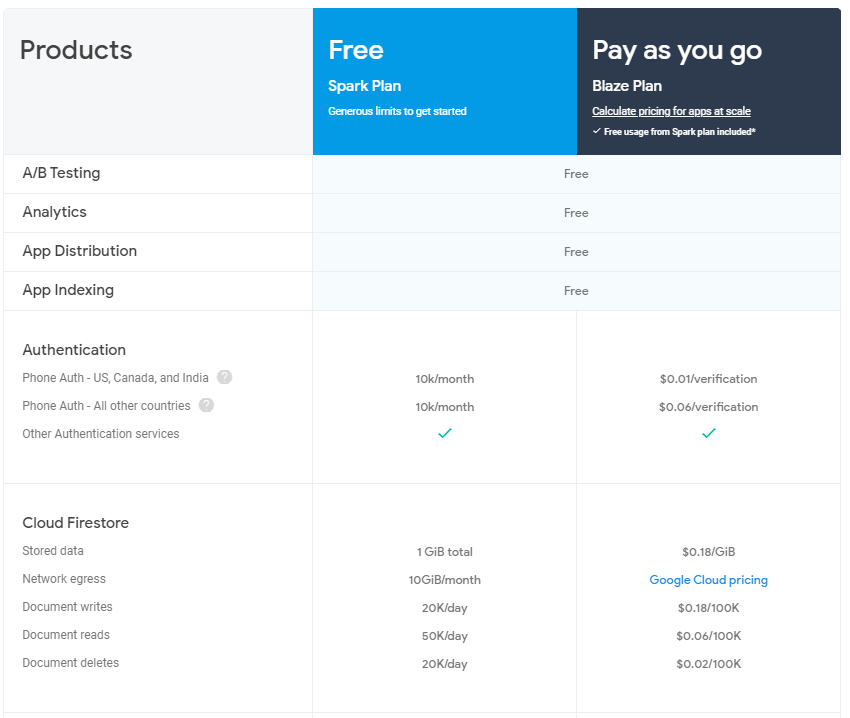
Khusus untuk cloud storage, kami sebenarnya bisa memilih cloud storage provider apa saja, karena seharusnya semuanya dapat men-support basic cloud file storage, dimana file dapat diunggah dan diunduh sesuai keinginan. Tetapi kami memilih Firebase, karena Spark Plan-nya, yang gratis, memberikan kami storage yang cukup besar (1 GB) pada plan gratisnya untuk file excel yang berisi jadwal sederhana. Sebenarnya Firebase memiliki fitur yang ekstensif dalam plan gratisnya (saya terkejut bagaimana caranya mereka dapat memberikan fitur sebanyak itu secara cuma-cuma), tetapi karena aplikasi kami cukup sederhana maka kami hanya akan menggunakan fitur cloud file storage-nya saja.Firebase Plan.png

storage.png

Untuk Frontend dan Backend, kami menyimpannya di Heroku Dyno untuk sekarang. Heroku Dyno adalah sebuah container linux ringan dimana sebuah aplikasi dapat disimpan. Alasan lengkap mengapa kami menggunakan Heroku dapat dilihat pada blog post ini, tetapi pendeknya adalah karena gratis, mudah dan men-support aplikasi kami yang berbasis javascript. Selain itu, jika client ingin mengubah domain-nya, klien dapat melakukannya secara cuma-cuma.

Untuk melengkapi penjelasan tentang arsitektur aplikasi kami, berikut adalah diagram arsitektur kami secara keseluruhan.

Untitled Diagram

Jika dilihat pada diagram, aplikasi kami memiliki beberapa use case, yaitu:

  1. Pembuatan jadwal secara otomatis, dan penyimpanan hasil jadwal dalam excel file yang telah dibuat di awan.
  2. Pengunduhan excel file yang telah dibuat.
  3. Display list excel yang telah dibuat dan disimpan di awan
  4. Pengunduhan excel file lawas yang telah disimpan di awan
  5. Pendelete-an excel yang tersimpan pada awan

Untuk use case pertama, front-end hanya perlu berkomunikasi dengan backend. Backend yang melakukan heavy lifting untuk generate schedule dan pengunggahan ke firebase cloud storage. Ini membuat front-end menjadi sederhana untuk didevelop dan saya rasa juga, fitur-fitur berat dari sisi teknis yang tidak perlu terlihat sebaiknya tidak diperlihatkan ke klien yang tidak terlalu tech-savvy (link akan menuju ke blog post tentang persona, yang menjelaskan sedikit lebih jauh tentang ini).

Untuk use-case kedua juga, agar backend tidak perlu berkomunikasi secara eksesif ke awan maka file xlsx akan di-generate secara otomatis. Seharusnya file excel yang sama dengan yang di-generate untuk diunggah ke awan akan diperoleh.

Untuk use-case ketiga, front-end akan melakukan request dua kali: pada awal, dan pada saat file excel baru telah diupload. Sinyal untuk melakukan request akan dikirim ketika frontend menerima response backend untuk use-case pertama.

Untuk use-case terakhir, past generated schedule yang sesuai dengan yang diminta pengguna akan diunduh ke device pengguna.

Dengan node.js, akan ada beberapa library yang dapat kami gunakan untuk men-generate xlsx secara otomatis. Salah satunya adalah ExcelJS.

Kemudian, kami harus menentukan berapa environment yang akan digunakan oleh aplikasi kami. Dengan dibantu oleh asisten dosen, kami memutuskan untuk menggunakan tiga environment

  1. Development Environment (local): Tempat kami menulis kode dan mencoba-coba kode yang kami tulis
  2. Staging Environment (heroku): Tempat kami mendeploy aplikasi untuk dinilai oleh product owner pada sprint review
  3. Production Environment: Tempat kami mendeploy aplikasi untuk digunakan oleh pengguna.

Tentu seiring berjalannya waktu, ini dapat berubah. Ada tanda-tanda bahwa kami harus menambahkan basis data ataupun file storage di masa depan, tetapi itu semua itu tergantung Product Owner dari aplikasi yang kami buat. Tetapi untuk sekarang, aplikasi kami memiliki arsitektur seperti diatas.

Update: Ternyata memang harus ditambahkan file storage. Detil pengimplementasian file storage ditulis diatas.

Bagaimana jika partner tidak ingin datanya berada di data center lain?

Jika kita tidak dapat menggunakan firebase maka ada dua cara yang dapat dilakukan. Yang pertama adalah untuk men-setup sebuah solusi penyimpanan data yang fungsionalitasnya persis dengan apa yang kita butuhkan dari Firebase. Dengan cara tersebut, seharusnya arsitekturnya tidak berubah, hanya saja Firebase digantikan dengan solusi penyimpanan data yang dibuat. Berikut kira-kira arsitekturnya, misalkan Solusi File Storage yang dibuat berdasarkan Node.js:

Untitled Diagram 2

Solusi tersebut membutuhkan sebuah server untuk di-setup dan API untuk download, upload, list dan delete file untuk dibuat.

Solusi kedua yang dapat saya tawarkan, yang lebih mudah untuk dibuat, adalah untuk menyimpan filenya di backend yang telah dibuat. Kita hanya perlu menambahkan API untuk download, list dan delete file. Berikut kira-kira arsitekturnya:Untitled Diagram 3

Heroku Ephemeral Filesystem

Sebelum saya jelaskan lebih jauh tentang solusi yang saya buat, saya akan menjelaskan terlebih dahulu mengapa saya harus menggunakan Firebase jika menggunakan Heroku Dyno. Setiap Heroku Dyno memiliki filesystem yang dapat digunakan untuk menyimpan file yang dibuat secara otomatis oleh aplikasi web yang di-deploy kedalamnya. Tetapi, filesystem tersebut bersifat ephemeral, yang berarti file tersebut akan terhapus ketika Heroku Dyno di-reset karena deployment terbaru ataupun karena normal dyno management yang terjadi setiap sekitar satu hari. Untuk informasi yang lebih lanjut tentang Heroku Ephemeral Filesystem dapat dilihat disini. Karena kita menggunakan solusi yang seluruhnya berada di sistem yang dimiliki oleh partner, maka kita bisa mengubahnya dengan solusi containerization yang berbeda, atau bahkan tidak menggunakan containerization sama sekali (tetapi ada beberapa keuntungan jika menggunakan Docker, yang saya elaborasikan sedikit lebih jauh di sini).

Mengubah Backend agar tidak lagi terhubung dengan Firebase

Jika anda melihat diagram arsitektur pertama yang saya berikan, maka anda dapat melihat bahwa hanya ada satu use-case yang menghubungkan Backend dan Firebase. Fungsionalitas tersebut direfleksikan pada kode dibawah, dimana setelah excel file dibuat, excel file tersebut akan disimpan:

Code snippet dari create_xlsx_table.js

function createXlsx(data_array) {
    let wb = xlsx.utils.book_new()
    let wsName = "Jadwal ujian";

    let data = {};

    register(data, data_array);
    let maxLengths = getMaxLengths(data);

    /* make worksheet */
    let wsData = [
        ['Jadwal kuliah'],
        [],
    ];
    let mergeData = [];
    let [headerXl, dayOutput] = fillHeader(data, mergeData);
    wsData.push(headerXl);
    
    let arrayOutput = [];
    wsData.push(...fillTableData(data, maxLengths, mergeData, arrayOutput));
    
    let ws = xlsx.utils.aoa_to_sheet(wsData);
    
    ws['!merges'] = mergeData;
    xlsx.utils.book_append_sheet(wb, ws, wsName);
    xlsx.writeFile(wb, 'files/output_jadwal_ujian.xlsx');
    // TODO: Replace this with actual name of file
    const nameOfFile = getCurrentDate(); 
    const options = {
        destination: nameOfFile + '.xlsx',
    }
    storageBucket.upload('files/output_jadwal_ujian.xlsx', options);
    return [dayOutput, arrayOutput]
}

Karena kita tidak ingin menggunakan Firebase, maka kita akan menghancurkan koneksi kita dengan firebase, dan menggantinya dengan penyimpanan secara lokal pada Backend. Berikut adalah modifikasi kodenya:

Code snippet dari create_xlsx_table.js

function createXlsx(data_array) {

    let wb = xlsx.utils.book_new()

    let wsName = "Jadwal ujian";

    let data = {};

    register(data, data_array);

    let maxLengths = getMaxLengths(data);

    /* make worksheet */

    let wsData = [

        ['Jadwal kuliah'],

        [],

    ];

    let mergeData = [];

    let [headerXl, dayOutput] = fillHeader(data, mergeData);

    wsData.push(headerXl);


    let arrayOutput = [];

    wsData.push(...fillTableData(data, maxLengths, mergeData, arrayOutput));


    let ws = xlsx.utils.aoa_to_sheet(wsData);


    ws['!merges'] = mergeData;

    xlsx.utils.book_append_sheet(wb, ws, wsName);

    xlsx.writeFile(wb, 'files/output_jadwal_ujian.xlsx');

    const nameOfFile = getCurrentDate(); 

    xlsx.writeFile(wb, 'files/history/' + nameOfFile + ".xlsx")

    return [dayOutput, arrayOutput]

}

Mengubah Frontend agar tidak lagi terhubung dengan Firebase

Kembali ke diagram arsitektur pertama yang saya berikan, maka anda dapat melihat bahwa ada tiga use case yang menghubungkan Firebase dengan Frontend. Use case ini akan kita ubah hubungannya dari Firebase ke Backend. Oleh karena itu, maka harus dibuat terlebih dahulu API yang akan menjadi sasaran request dari Frontend. Berikut adalah file yang mengandung ketiga endpoint yang saya buat untuk menerima requestnya; satu untuk setiap use case:

Kode pada list_file.js

const express = require('express');

const fs = require('fs');

const folderName = 'files/history/'

router = express.Router();

router.get('/', function (req, res, next) {

    //returns file metadata

    fs.readdir(folderName, function (err, files){

        listOfFiles = [];

        if (err){

            console.log('Unable to scan directory: ' + err);

            return 

        } files.forEach(function (file) {

            let filesize = fs.statSync(folderName + file)["size"];

            let pushed = {"name": file, "size": filesize}

            listOfFiles.push(pushed);

        });

        console.log(listOfFiles);

        res.status(200).send({"items": listOfFiles});

    });

});

router.get('/download/:filename', function (req, res, next) {

    filename = folderName + req.params.filename;

    console.log(filename);

    console.log(fs.existsSync(filename));

    if (fs.existsSync(filename)) {

        res.status(200).download(filename);

    } else {

        res.status(500).send({valid: false});

    }

});

router.get('/delete/:filename', function(req, res, next) {

    filename = folderName + req.params.filename;

    console.log(filename);

    console.log(fs.existsSync(filename));

    if (fs.existsSync(filename)){

        fs.unlinkSync(filename);

        res.status(200).send({valid: true});

    } else {

        res.status(500).send({valid: false});

    }

});

module.exports = router;

Agar file ini digunakan, maka saya menambahkan ini ke app.js:

Snippet app.js

var listFile = require('./routes/list_file');

...

app.use('/list_file', listFile);

...

Kemudian, saya harus mengubah kode yang ada pada Frontend untuk melakukan request ke Backend daripada ke Firebase. Berikut adalah kode yang akan saya ubah:

Snippet pada FileDropdown.jsx

getList = async () => {
        var returnedListOfFile = [];
        var totalSizeOfFile = 0;
        var listRef = storage.ref("")
        const results = await listRef.listAll()
        for (let i = 0; i < results.items.length; i++){
            const eachMetadata = results.items[i].getMetadata()
            returnedListOfFile.push(results.items[i]);
            totalSizeOfFile = totalSizeOfFile + eachMetadata.size;
        }
        this.setState({ listOfFiles: returnedListOfFile, totalStorageOccupied: totalSizeOfFile})
        this.setVisible("visible")
    }

    deleteFile = async (name) => {
        console.log(name)
        storage.ref("").child(name).delete()/*.then(function() {
            // File deleted successfully
            //console.log(name + " deleted successfully")
          }).catch(function(error) {
            // Uh-oh, an error occurred!
           // console.log("failure to delete " + name)
          });*/
          await this.setVisible("hidden")
    }

    setVisible = (visibility) => {
        this.setState({ dropdownVisibility: visibility})
    }

    downloadFile = async (name) => {
        window.location.href = await storage.ref("/").child(name).getDownloadURL()
    }

    getListOfFiles() {
        return this.state.listOfFiles;
    }

    render(){
        let listOfFiles = this.getListOfFiles();
        return <>
        <div className = "navbarButton"><Button id = "menuButtonFiles" onClick = {this.state.dropdownVisibility === "visible"? () => this.setVisible("hidden") : this.getList }> <FaBars size={"70px"} /></Button></div>
        <div className = "dropdown" style={{visibility: this.state.dropdownVisibility}}>
            {listOfFiles.map(
            eachFile => <div key = {eachFile.name} id = {eachFile.name}><div>{eachFile.name}</div>
                            <div className = "dropdownButtons"><div><Button className = "downloadButton" onClick = {() => this.downloadFile(eachFile.name)} download> Download </Button>
                            <Button className = "deleteButton" onClick = {() => this.deleteFile(eachFile.name)}> Delete </Button></div></div><hr/></div>
        )}
        <div>{this.state.totalStorageOccupied + 0} / {1073741824 * 5} of storage occupied.</div></div>
        {/*<div> Upload Progress { this.state.progress}</div>
        <div>{ "unknown"} / 1073741824 bytes downloaded per day</div>
        <div>{ "unknown" } / 20k upload operations </div>
        <div>{ "unknown" } / 50k download operations</div>*/}
        </>
    }
}

Berikut adalah perubahannya:

Snippet pada FileDropdown.jsx

 getJSON(url){

        return new Promise(function (resolve, reject){

            var xhr = new XMLHttpRequest();

            xhr.open('GET', url, true);

            xhr.responseType = 'json';

            xhr.onload = function() {

                var status = xhr.status;

                if (status === 200){

                    resolve(xhr.response)

                } else {

                    reject(status);

                }

            };

            xhr.send();

        })

    }


    // from https://web.archive.org/web/20200502183806/http://janhesters.com/updater-functions-in-setstate/

    // async from https://developer.mozilla.org/en-US/docs/Web/JavaScript/Reference/Statements/async_function

    getList = async () => {

        var returnedListOfFile = [];

        var totalSizeOfFile = 0;

        var results = await this.getJSON(this.props.listUrl);

        //Get this function call to give the results synchronously so that the result will be set to data before running the for loop.

        for (let i = 0; i < results.items.length; i++){

            const eachMetadata = results.items[i]

            returnedListOfFile.push(eachMetadata);

            totalSizeOfFile = totalSizeOfFile + eachMetadata.size;

        }

        this.setState({ listOfFiles: returnedListOfFile, totalStorageOccupied: totalSizeOfFile})

        this.setVisible("visible")

    }

    deleteFile = async (name) => {

        console.log(name)

        this.getJSON(this.props.listUrl + "/delete/" + name)

        await this.setVisible("hidden")

    }

    setVisible = (visibility) => {

        this.setState({ dropdownVisibility: visibility})

    }

    downloadFile = async (name) => {

        this.getJSON(this.props.listUrl + "/download/" + name)

    }

    getListOfFiles() {

        return this.state.listOfFiles;

    }

    render(){

        let listOfFiles = this.getListOfFiles();

        return <>

        <div className = "navbarButton"><Button id = "menuButtonFiles" onClick = {this.state.dropdownVisibility === "visible"? () => this.setVisible("hidden") : this.getList }> <FaBars size={"70px"} /></Button></div>

        <div className = "dropdown" style={{visibility: this.state.dropdownVisibility}}>

            {listOfFiles.map(

            eachFile => <div key = {eachFile.name} id = {eachFile.name}><div>{eachFile.name}</div>

                            <div className = "dropdownButtons"><div><Button className = "downloadButton" onClick = {() => this.downloadFile(eachFile.name)} download> Download </Button>

                            <Button className = "deleteButton" onClick = {() => this.deleteFile(eachFile.name)}> Delete </Button></div></div><hr/></div>

        )}

        <div>{this.state.totalStorageOccupied + 0} / {1073741824 * 5} of storage occupied.</div></div>

        </>

    }

}

Mengingat cara pengimplementasiannya beda, maka kodenya tidak sama persis dengan pengimplementasian ketika ada Firebase. Tetapi, dengan kode yang saya buat, seharusnya layanan dapat berfungsi sesuai keinginan.

Anda mungkin melihat bahwa ada tambahan metode getJSON(url) yang saya buat. Itu sebenarnya adalah metode yang membuat request kepada sebuah endpoint dan memberikan JSON yang di-return. JSON tersebut bisa diproses menjadi suatu variabel, ataupun tidak tergantung dari kode selanjutnya. Anda juga mungkin melihat bahwa ada this.props.listUrl untuk semua link yang diberikan. Hal tersebut dikarenakan kami hanya ingin men-set linknya di satu file js yang sama, yaitu App.js dan mengoper setting tersebut ke komponen yang membutuhkannya. Berikut adalah isi App.js aplikasi Frontend kami:

import React from 'react';

import './App.css';

import PageContainer from './components/PageContainer.jsx';

const BACKEND_URL = "http://localhost:3000"

//const BACKEND_URL = "https://susun-jadwal-backend-staging.herokuapp.com"

function App() {

  return (

    <PageContainer

      schedulePostUrl={BACKEND_URL + "/upload/schedule"}

      roomsPostUrl={BACKEND_URL + "/upload/room"}

      tableGetUrl={BACKEND_URL + "/get_table"}

      downloadUrl={BACKEND_URL + "/download"}

      listUrl={BACKEND_URL + "/list_file"}

    />

  );

}

export default App;

Karena backend merupakan localhost, maka backend url yang di-set adalah localhost:3000.

Men-setup docker swarm

Jika anda melihat kembali diagram yang saya buat, anda akan mengetahui bahwa solusi yang saya buat adalah untuk membuat container untuk setiap service. Menggunakan satu file docker-compose.yml dan Dockerfile untuk setiap service, maka saya dapat menggunakan satu command saja untuk mem-build image, yaitu

docker-compose build

Berikut adalah Dockerfile yang saya buat untuk setiap service dan file docker-compose.yml yang saya buat.

Dockerfile (identik untuk setiap file)

# pull official base image
FROM node:slim
# set working directory
WORKDIR /app
# install app dependencies
COPY package.json /app
RUN npm install --silent

# add app
COPY . /app

EXPOSE 3000

# start app
CMD ["npm", "start"]

docker-compose.yml

version: "3.7"

services:

  frontend:

    build:

      context: ./frontend

      dockerfile: Dockerfile

    image: manullangc/susunjadwal-frontend:latest

    ports: 

      - 3001:3000

    stdin_open: true

  backend:

    build:

      context: ./backend

      dockerfile: DockerFile

    ports: 

      - 3000:3000

    stdin_open: true

    volumes:

      - files:/app/files/history

    image: manullangc/susunjadwal-backend:latest

volumes:

  files:

Sedikit penjelasan tentang Dockerfile tersebut. Dockerfile tersebut akan melakukan hal-hal ini:

  1. Mengambil Image Node yang terminim (:slim). Ini bisa juga diubah ke versi yang anda inginkan
  2. Set Working Directory, yang berarti membuat folder baru dimana kita akan mengkonstruksi Docker Container
  3. Menyalin package.json ke Working Directory dan menginstall Dependencies
  4. Menyalin file-file yang berhubungan ke aplikasi yang anda buat ke Working Directory
  5. Meng-expose port 3000 sehingga bisa diakses dari luar (sangat penting agar dapat melakukan port forwarding)
  6. Menjalankan command yang ada di dalam array. Docker akan menganggap array satu baris input ke terminal tersebut dan setiap indeks array diberi jeda spasi.

Kemudian berdasarkan file docker-compose.yml, maka saat docker-compose build dijalankan, maka hal ini akan terjadi:

  1. Kita men-set versi file format dari compose file yang kami buat. Untuk lebih lanjutnya dapat dilihat di sini tetapi pendeknya adalah: versi mempengaruhi kompatibilitas dengan Docker Engine yang digunakan. Karena kami menggunakan Docker Engine 18.06.0, maka kami menggunakan version 3.7 sebagai versi file format kami.
  2. Kami men-set kedua service kami yaitu frontend dan backend
  3. Kami men-set build (ini sama dengan command Docker Build) dengan konteks yaitu folder dimana service kami berada dan Dockerfile yang digunakan untuk membantu proses Build tersebut. Sebenarnya bisa saja tidak menggunakan Dockerfile, tetapi kita harus menulis command sendiri di docker-compose.yml yang dibuat.
  4. Kemudian kita melakukan port forwarding. Ini penting untuk dilakukan karena default port untuk Node.js adalah 3000, dan jika anda belum tahu, setiap port hanya akan dapat dihubungkan ke satu aplikasi/service. Oleh karena itu, untuk salah satu service, kita harus menghubungkannya ke port lain. Men-set port akan mem-port forward aplikasi tersebut dari port dimana aplikasi tersebut berjalan pada Docker Container ke port local ataupun server dimana docker container dijalankan.
  5. stdin_open: true ditambahkan karena menurut dokumentasi hal tersebut akan menyelesaikan masalah-masalah common yang dialami jika melakukan containerization aplikasi node.
  6. Mensetup nama image yang akan dihasilkan dari proses build tersebut.
  7. Menset directory yang akan menjadi mount point dari volume
  8. Mendefinisikan volume yang ada

Anda mungkin melihat bahwa saya menaruh volume di situ. Saya melakukan hal itu karena jika tidak dibuat volume, maka data akan tertulis pada Container Layer, dan file yang tertulis disitu akan hilang ketika Container tersebut di-reset (mirip dengan konsep filesystem yang dimiliki oleh Heroku Dyno). Oleh karena itu, saya menggunakan volume agar file tersebut dapat tersimpan meski container di-reset karena alasan apapun. Untuk mengetahui lebih lanjut tentang volume, anda dapat membuka tautan berikut ini.

Dengan asumsi bahwa file sudah berada di server partner yang OSnya adalah Windows Server 2019, dengan docker desktop telah diinstall (atau Linux dengan Docker engine telah terinstal), domain telah di-setup untuk IP address dari server, dan port 3000 telah diforward ke port 80, maka kita dapat melakukan  hal ini untuk menjalankan aplikasinya:

docker swarm init
docker stack deploy -c docker-compose.yml susunjadwal

Sedikit penjelasan, docker swarm init akan membuat mesin tersebut menjadi manager dari swarm yang dibuat, kemudian command kedua akan mendeploy proyek ke swarm tersebut.

Setelah itu, anda dapat langsung mengakses servernya dengan membuka domain yang telah anda setup untuk IP address dari server tersebut.

Anda dapat men-clone project saya, yang merupakan fork dari build yang sedang dikerjakan pada saat itu, dengan mengklik link berikut, dan menggunakan command yang sama untuk menjalankannya di komputer anda.

Untuk mengetahui bagaimana cara kami men-setup CI/CD untuk aplikasi kami, anda dapat mengakses tautan ini.

Penutup

Seperti yang telah didemonstrasikan di atas, karena kita mengetahui bagaimana setiap komponen disusun dan hubungannya antara satu komponen dengan komponen yang lainnya, kita bisa dengan sederhana menggantikan Firebase dengan suatu komponen yang memiliki fungsionalitas identik atau, dan juga menggabungkannya ketika kita merasa bahwa komponen tersebut dapat digabungkan. Komponen yang memiliki cara berkomunikasi yang serupa dapat dihubungkan jika dibutuhkan, dan hubungannya dapat diubah, seperti halnya saya menambahkan fungsionalitas dari hubungan antara frontend dan backend pada saat saya menggabungkan file storage dengan backend.

Manfaat memiliki Software Architecture adalah untuk membantu kita untuk memvisualisasikan susunan aplikasi kita secara keseluruhan, dan juga untuk membantu kita ketika ingin melakukan modifikasi di masa depan. Oleh karena itu, ada pentingnya jika kita membuat arsitektur perangkat lunak yang kita akan buat pada saat itu di awal pengembangan perangkat lunak, meski nantinya kita mungkin akan mengubahnya.

Deployment, Continuous Integration, Software Quality Assurance

Deployment

Secara singkat, deployment merupakan suatu aksi yang membuat suatu aplikasi dapat digunakan. Terdapat beberapa strategi deployment yang banyak digunakan pada industri. Saya akan mencoba menjelaskan sebagian dari apa yang saya ketahui, kemudian saya akan mencoba mencocokkan strategi deployment yang saya jelaskan ke strategi yang digunakan pada aplikasi kami.

Sebagai bantuan, katakan ada aplikasi A, yang merupakan aplikasi yang telah ada pada server, dan aplikasi B, yang merupakan aplikasi yang ingin di-deploy. Asumsi juga cara menjalankan aplikasi yang telah di-deploy adalah dengan command yang telah di-setup melalui script yang berjalan secara otomatis.

Strategi Big-Bang atau Replace/Recreate

Strategi yang pertama, yang menurut saya adalah strategi yang paling sederhana, adalah strategi Big-Bang, atau bisa dikatakan juga sebagai strategi Replace/Recreate. Strategi replace dan recreate merupakan strategi yang kurang lebih berjalan seperti ini:  aplikasi A akan diturunkan terlebih dahulu, kemudian aplikasi B akan disalin ke server setelah aplikasi A sepenuhnya turun. Setelah aplikasi B telah disalin secara keseluruhan, maka aplikasi B akan dijalankan.

Strategi ini mengharuskan adanya waktu turun, yang terjadi saat aplikasi A diturunkan, sampai aplikasi B disalin dan selesai dijalankan. Tergantung dari skala aplikasinya, waktu turun dapat menjadi kecil, atau besar. Tentu waktu turun akan bertambah jika terjadi masalah dalam deployment.

Strategi Ramped

Strategi Ramped adalah strategi dimana aplikasi yang telah ada di server digantikan instansinya dengan yang baru sampai semuanya telah digantikan. Hal ini terjadi seperti berikut: Katakan ada sekelompok server A yang disajikan melalui Load Balancer. Satu instansi dari aplikasi B dibuat, kemudian di-deploy.  Ketika instansi tersebut sudah siap menerima traffic, baru ditambahkan ke kelompok server yang disajikan. Kemudian, salah satu dari instansi yang ada di dalam kelompok tersebut akan dimatikan. Hal ini akan berjalan terus sampai instansi aplikasi A sepenuhnya dimatikan dan digantikan dengan instansi aplikasi B.

Instansi yang di-deploy secara bersamaan tidak harus satu. Deployment dapat dilakukan dengan lebih dari satu instansi aplikasi pada waktu tertentu secara bersamaan. Ketika aplikasi B gagal di-deploy, maka dapat dilakukan rollback, yang tentu membutuhkan waktu.

Perlu diingat bahwa agar aplikasi B dapat di-deploy secara keseluruhan, karena aplikasinya di-deploy secara gradual, maka akan memakan waktu yang relatif lebih banyak dibandingkan strategi Big Bang.

Strategi Blue/Green (Biru/Hijau)

Strategi Blue-Green berbeda dengan Strategi Ramped dimana aplikasi B akan di-deploy secara bersamaan dengan aplikasi A yang telah di-deploy sebelumnya. Instansi yang akan di-deploy adalah sama untuk kedua aplikasi tersebut. Ketika aplikasi B telah diuji dan sesuai ketentuan, maka load balancer akan diatur untuk hanya menyajikan instansi dari aplikasi B saja.

Di sini diperoleh keuntungan dimana jika aplikasi B tidak sesuai ketentuan, maka kita hanya perlu mematikan instansinya saja, atau melepaskan koneksi instansi aplikasi B dari load balancer. Hanya saja, karena dibutuhkan jumlah instansi yang sama untuk kedua aplikasi, maka sumber daya yang dibutuhkan adalah dua kali lebih banyak dibandingkan strategi sebelumnya.

Strategi Canary

Strategi Canary berbeda dengan strategi blue-green dimana traffic dipindahkan secara gradual dari aplikasi A ke aplikasi B dengan metrik berupa weight. Ini digunakan ketika test tidak reliable dan developer lebih memilih untuk menguji aplikasinya secara langsung.

Karena deployment dilakukan secara gradual, maka waktu deployment akan relatif lama dibandingkan metode yang melakukannya secara langsung. Tetapi, jika ingin dilakukan rollback, maka akan relatif lebih cepat karena seluruh instansi bisa saja belum semuanya diganti.

Strategi A/B

Strategi A/B mirip dengan Canary, tetapi kondisi yang digunakan bukan hanya weight, melainkan kondisi yang ditentukan secara khusus untuk aplikasi tersebut oleh developer. Ini biasa digunakan untuk deployment dua versi aplikasi yang memiliki desain UI/UX yang berbeda untuk menguji user retention, atau menguji kesuksesan suatu versi berdasarkan statistika.

Strategi Shadow

Strategi Shadow merupakan strategi yang mirip dengan Blue/Green, tetapi alih-alih men-switch secara langsung, traffic yang pergi ke A akan juga dikirimkan ke B. Ini memiliki kelemahan yang serupa dengan Blue/Green, yaitu sumber daya yang dibutuhkan adalah dua kali lebih banyak dibandingkan strategi Ramped.

Keuntungan dari strategi ini adalah ini dapat dijadikan sebagai penguji load, dan juga performa yang memiliki pengaruh yang minim ke user.

Deployment Pada Aplikasi Kami

Pada saat saya berbicara dengan asisten dosen dan menggunakan kata docker, dia mengatakan kepada saya “Buat apa pakai docker?” dengan nada yang “unik”. Saya sampai kesal karena ini bukan hanya sekali, tetapi setiap kali saya berbicara tentang deployment menggunakan docker. Padahal, meski setup docker agak lama di awal, akan ada banyak sekali benefit yang di berikan, beberapa diantaranya yaitu:

  1. Selama production environment dapat menjalankan docker image, maka tidak perlu lagi memikirkan kompatibilitas aplikasi kita dengan production environment dan juga tidak perlu memikirkan dependencies yang butuh diinstal (asumsi pada saat development ini sudah disetup dan tidak didelete setelah selesai development)
  2. Jika anggota memiliki komputer yang kompatibel dengan docker, maka setup dependencies hanya perlu dilakukan sekali.
  3. Dalam environment manapun, asumsi docker image telah disetup secara identik, maka aplikasi akan berjalan secara identik.

Oleh karena itu saya enggan men-setup docker di aplikasi kami, dan berencana ketika aplikasi di-deploy ke production menggunakan cara alternatif yang disarankan oleh asisten dosen saya yaitu:

  1. Meng-copy file ke server
  2. Melakukan install dependencies
  3. Menjalankan server.

Dan juga untuk development, menggunakan cara setup seperti berikut:

  1. Mencopy/clone file ke komputer
  2. Melakukan install dependencies
  3. Mulai development

Khusus untuk staging, kami menggunakan cara yang serupa, hanya saja kami meng-otomasinya. Target deployment di staging adalah Heroku Dyno. Strategi yang kami gunakan adalah strategi Big-Bang Deployment, yang akan terjadi setiap kali kita push ke repository. Untuk lebih detilnya akan dijelaskan pada bagian Continuous Integration dan Software Quality Assurance pada aplikasi kami.

Ini adalah metode yang konvensional dan membutuhkan kita untuk mengetahui:

  1. Spesifikasi hardware dan software (termasuk OS) yang digunakan pada production
  2. Spesifik untuk development, semua hardware dan software yang digunakan oleh setiap anggota pada development team.

Frontend dan backend aplikasi kami menggunakan package manager yang berbeda, backend menggunakan NPM, sementara frontend menggunakan Yarn. Awalnya adalah untuk mengevaluasi keduanya, tetapi saya berencana untuk memindahkan semuanya ke NPM, dikarenakan NPM memiliki satu fitur krusial yang tidak dimiliki oleh Yarn dan berguna untuk development aplikasi kami, yaitu Auto Install Updates for Vulnerable Dependencies.

Fitur ini dapat dijalankan menggunakan command npm audit fix. Ada beberapa parameter lain yang dapat digunakan, tetapi untuk aplikasi kami, menjalankan command tersebut tanpa parameter cukup untuk menghilangkan seluruh vulnerability karena dependency yang ada.

Developer Yarn tidak memiliki rencana untuk mengeluarkan fitur ini anytime soon, karena isu yang mendeskripsikan tidak adanya fitur ini ditutup https://github.com/yarnpkg/yarn/issues/7075. 

Continuous Integration

Continuous Integration adalah praktik pengembangan perangkat lunak dimana developer mengintegrasikan kode ke shared repository sesering mungkin. Meski setiap integrasi akan dibarengi dengan tes dan build yang dilakukan secara otomatis, tes dan build tersebut bukanlah bagian dari Continuous Integration.

Meski dapat disingkat menjadi CI/CD, Continuous Integration berbeda dengan Continuous Deployment dan Continuous Delivery.  Continuous Delivery adalah praktik pengembangan perangkat lunak dimana aplikasi yang dibuat harus deployable jika telah lolos semua tes yang diotomasi. Aplikasi itu kemudian dapat di-deploy secara manual oleh tim Developer. Continuous Deployment mirip dengan Continuous Delivery, hanya saja deployment terjadi secara otomatis.

Software Quality Assurance

Software Quality Assurance adalah proses yang memastikan bahwa apa yang kami lakukan dalam proses pembuatan perangkat lunak adalah sesuai dengan standar yang telah ditetapkan. Untuk kasus kami, karena kami melakukan ini sebagai proyek dari salah satu mata kuliah, maka standar yang kami pakai adalah standar yang telah ditetapkan untuk mata kuliah tersebut.

Continuous Integration dan Software Quality Assurance pada aplikasi kami

Continuous Integration untuk aplikasi kami dihandle secara otomatis melalui CI/CD di dalam repository Gitlab dengan bantuan referensi konfigurasi dalam .gitlab-ci.yml, dan Software Quality Assurance akan dibantu dengan aplikasi SonarQube.

Sebelum saya lanjut ke snippet .gitlab-ci.yml kami, saya akan menjelaskan terlebih dahulu apa itu SonarQube. SonarQube (sebelumnya bernama Sonar) adalah sebuah perkakas yang digunakan untuk menginspeksi kualitas kode dan keamanan dari keseluruhan kode, dan membantu proses review kode. SonarQube mensupport 27 bahasa (termasuk bahasa Javascript yang kami gunakan), dan dapat dimasukkan dalam Pipeline CI/CD yang diatur melalui referensi konfigurasi yang dibuat.

sonarqube continuous inspection

Dengan memakai SonarQube, kami didorong untuk menjunjung tinggi Continuous Inspection, dengan Leak Management, Branch Analysis, Parallel Report Processing, Governance Features, High Availability serta Short Feedback Loop.

Sonar

Selain itu, Sonarqube memiliki Quality Gate, suatu fitur yang menginformasikan apakah aplikasi yang dibuat lolos atau gagal kriteria rilis. Jika telah lolos, maka akan ada tanda “Quality Gate Passed”, dan kalau gagal akan ada tanda “Quality Gate Failed”.

Karena saya rasa penjelasan tentang SonarQube sudah cukup, berikut adalah snippet dari gitlab-ci.yml kami:

stages:
  - test
  - linter
  - qa
  - staging-frontend
  - staging-backend
test-frontend:
  image: node:latest
  stage: test
  before_script:
    - cd frontend
    - yarn install
  script:
    - yarn run test --coverage
  artifacts:
    paths:
      - ./frontend/coverage
    expire_in: 1 hrs
  tags:
    - docker
test-backend:
  image: node:latest
  stage: test
  before_script:
    - cd backend
    - npm install
  script:
    - npm run test --coverage
  artifacts:
    paths:
      - ./backend/coverage
    expire_in: 1 hrs
  tags:
    - docker
linter-frontend:
  image: node:latest
  stage: linter
  before_script:
    - cd frontend
    - npm install
    - yarn add eslint --dev
  script:
    - npx eslint -f json -o report.json src/
  artifacts:
    paths:
      - ./frontend/report.json
    expire_in: 1 hrs
  tags:
    - docker
linter-backend:
  image: node:latest
  stage: linter
  before_script:
    - cd backend
    - npm install
    - npm install eslint --save-dev
  script:
    - npx eslint -f json -o report.json ./
  artifacts:
    paths:
      - ./backend/report.json
    expire_in: 1 hrs
  tags:
    - docker
SonarScanner:
  image: addianto/sonar-scanner-cli:latest
  dependencies:
    - test-frontend
    - test-backend
    - linter-frontend
    - linter-backend
  stage: qa
  script:
  - sonar-scanner -X -Dsonar.host.url="https://pmpl.cs.ui.ac.id/sonarqube" -Dsonar.login=$SONARQUBE_TOKEN -Dsonar.branch.name=$CI_COMMIT_REF_NAME -Dsonar.projectKey=$SONARQUBE_PROJECT_KEY
staging-frontend:
  image: ruby:2.4
  stage: staging-frontend
  before_script:
    - cd frontend
    - gem install dpl
    - wget -qO- https://cli-assets.heroku.com/install-ubuntu.sh | sh
  script:
    - dpl --provider=heroku --app=$HEROKU_APP_NAME --api-key=$HEROKU_API
    - heroku run --app $HEROKU_APP_NAME migrate
  environment:
    name: production
    url: $HEROKU_APP_HOST
  only:
    - staging
staging-backend:
  image: ruby:2.4
  stage: staging-backend
  before_script:
    - cd backend
    - gem install dpl
    - wget -qO- https://cli-assets.heroku.com/install-ubuntu.sh | sh
  script:
    - dpl --provider=heroku --app=$HEROKU_APP_NAME_BACKEND --api-key=$HEROKU_API
    - heroku run --app $HEROKU_APP_NAME migrate
  environment:
    name: production
    url: $HEROKU_APP_HOST
  only:
    - staging

Untuk aplikasi kami, kami membaginya dalam lima stage, dan setiap stage memiliki jumlah job yang berbeda. Berikut adalah konfigurasi job dan stage untuk aplikasi kami:

  1. stage “test”, yang memiliki dua job yaitu “test-frontend” dan “test-backend” yang menjalankan test case untuk setiap aplikasi. Setiap job ini akan menghasilkan artifact berupa hasil dari test beserta coveragenya.
  2. stage “linter”, yang memiliki dua job yaitu “linter-frontend” dan “linter-backend” yang menjalankan linter untuk setiap aplikasi. Setiap job ini akan menghasilkan artifact berupa hasil dari linter.
  3. stage “qa”, yang memiliki satu job yaitu “SonarScanner” yang dijalankan untuk quality assurance bagi branch yang bersangkutan. Karena sonarqube tidak melakukan testing dan linting secara otomatis, dan hanya menerima hasil dari eksekusi test dan linter, maka artifactnya diprovide ke job ini agar bisa diproses oleh sonarqube.
  4. stage “staging-frontend”, yang memiliki satu job yaitu “staging-frontend” yang dijalankan untuk mendeploy aplikasi ke staging environment di heroku.
  5. stage “staging-backend”, yang memiliki satu job yaitu staging-backend yang dijalankan untuk mendeploy aplikasi ke staging environment di heroku.

Alasan mengapa deployment frontend dan backend ke heroku tidak dilakukan pada stage yang sama adalah karena plan gratis heroku hanya memperbolehkan satu concurrent builds.

Alasan mengapa staging dilakukan pada Heroku adalah:

  1. Mensupport banyak bahasa dan environment, termasuk Javascript dan Node.js yang digunakan oleh aplikasi kami. Karena itu, kami tidak perlu memikirkan kompatibilitas.
  2. Heavy lifting is done at the back. Ini sangat memudahkan deployment. Dengan Script sesedikit apa yang anda lihat pada .gitlab-ci.yml dan sedikit setup environment variables pada Gitlab, aplikasi dapat terdeploy dengan sukses.
  3. It’s free and scalable. Banyak dev team telah menggunakan heroku untuk mendeploy MVP mereka dan beberapa dari mereka bahkan tetap menggunakan Heroku sebagai platform of choice karena skalabilitasnya dan entry price gratisnya, meski dalam plan freenya dyno heroku tidur terlalu cepat dan bangunnya cukup lama (tapi tidak apa apa untuk staging environment).

Bagaimana Jika Aplikasi Kami Dijalankan Dengan Bantuan Docker?

Seperti saya jelaskan sebelumnya sebenarnya bisa saja aplikasi kami dijalankan menggunakan docker pada server client, selama docker kompatibel pada mesin tersebut. Maka dari itu, saya akan menjelaskan simulasi running aplikasi menggunakan docker di mesin saya secara lokal.

Sebelumnya, saya akan menjelaskan kembali arsitektur aplikasi kami secara pendek (jika anda ingin melihat secara lengkap penjelasan tentang arsitektur aplikasi kami, maka anda bisa mengklik tautan ini). Aplikasi kami memiliki 3 service: Frontend, Backend dan Storage. Frontend dan Backend masing-masing ditaruh di heroku dyno, sementara untuk Storage, kami menggunakan Firebase Cloud Storage yang berbasis Google Cloud Storage.

Mari kita mengubah “pembungkus” aplikasi dari Heroku Dyno menjadi Docker Container. Untuk melakukannya, kita harus membuat Dockerfile untuk Frontend dan Backend secara masing-masing. Setiap Dockerfile akan membantu kita membuat satu container.

Berikut adalah Dockerfile yang saya buat untuk Frontend dan Backend.

# pull official base image

FROM node:latest

# set working directory

WORKDIR /app

# install app dependencies

COPY package.json /app

RUN npm install --silent

# add app

COPY . /app

EXPOSE 3000

# start app

CMD ["npm", "start"]

Di sini, setiap baris merupakan satu command, dan command tersebut akan dieksekusi secara sekuensial. Berikut hal-hal yang akan dilakukan oleh Dockerfile kami:

  1. Mengambil Image Node yang terbaru (:latest). Ini bisa juga diubah ke versi yang anda inginkan
  2. Set Working Directory, yang berarti membuat folder baru dimana kita akan mengkonstruksi Docker Container
  3. Menyalin package.json ke Working Directory dan menginstall Dependencies
  4. Menyalin file-file yang berhubungan ke aplikasi yang anda buat ke Working Directory
  5. Meng-expose port 3000 sehingga bisa diakses dari luar (sangat penting agar dapat melakukan port forwarding)
  6. Menjalankan command yang ada di dalam array. Docker akan menganggap array satu baris input ke terminal tersebut dan setiap indeks array diberi jeda spasi.

Mungkin sekarang anda akan bertanya, mengapa Dockerfile yang digunakan berisi hal yang sama? Alasannya adalah karena kedua service tersebut, Backend dan Frontend, berbasis Node.js dan tidak memiliki konfigurasi khusus yang membutuhkan kita untuk membuat Dockerfile yang berbeda. Alasan ini juga berlaku ke dockerignore file, yang dibuat agar file-file yang tidak dibutuhkan tidak dicopy ke container. Berikut adalah dockerignore file yang saya tulis:

node_modules
build
.dockerignore
Dockerfile
Dockerfile.prod

Sekarang, sebenarnya aplikasi sudah dapat dijalankan dengan melakukan Docker Build, dan Docker Run kepada setiap service. Tetapi saya merasa bahwa hal itu merupakan hal yang dapat dibuat automated dengan menggunakan Docker Compose.

Sedikit penjelasan, Docker Compose adalah sebuah alat yang dapat digunakan untuk menjalankan aplikasi Docker yang memiliki lebih dari satu container/Multi-Container Apps. Aplikasi kami memiliki dua container, oleh karena itu memenuhi kriteria untuk menggunakan tool ini.

Untuk menggunakan Docker Compose, kita perlu membuat docker-compose.yml yang merupakan konfigurasi keseluruhan Docker Compose. Berikut adalah isi docker-compose.yml kami:

version: "3.7"

services:

  frontend:

    build:

      context: ./frontend

      dockerfile: Dockerfile

    ports: 

      - 3001:3000

    stdin_open: true

  backend:

    build:

      context: ./backend

      dockerfile: DockerFile

    ports: 

      - 3000:3000

    stdin_open: true

Berikut adalah deskripsi setiap hal yang tertulis pada docker-compose.yml tersebut:

  1. Kita men-set versi file format dari compose file yang kami buat. Untuk lebih lanjutnya dapat dilihat di sini tetapi pendeknya adalah: versi mempengaruhi kompatibilitas dengan Docker Engine yang digunakan. Karena kami menggunakan Docker Engine 18.06.0, maka kami menggunakan version 3.7 sebagai versi file format kami.
  2. Kami men-set kedua service kami yaitu frontend dan backend
  3. Kami men-set build (ini sama dengan command Docker Build) dengan konteks yaitu folder dimana service kami berada dan Dockerfile yang digunakan untuk membantu proses Build tersebut. Sebenarnya bisa saja tidak menggunakan Dockerfile, tetapi kita harus menulis command sendiri di docker-compose.yml yang dibuat.
  4. Kemudian kita melakukan port forwarding. Ini penting untuk dilakukan karena default port untuk Node.js adalah 3000, dan jika anda belum tahu, setiap port hanya akan dapat dihubungkan ke satu aplikasi/service. Oleh karena itu, untuk salah satu service, kita harus menghubungkannya ke port lain. Men-set port akan mem-port forward aplikasi tersebut dari port dimana aplikasi tersebut berjalan pada Docker Container ke port local ataupun server dimana docker container dijalankan.
  5. stdin_open: true ditambahkan karena menurut dokumentasi hal tersebut akan menyelesaikan masalah-masalah common yang dialami jika melakukan containerization aplikasi node.

Setelah selesai, anda dapat menjalankan docker-compose up, atau dapat menjalankan aplikasi tersebut menggunakan docker swarm.


Penutup

Aplikasi yang saya buat adalah aplikasi penyusun jadwal ujian yang terdiri dari tiga komponen: Frontend, Backend dan File Storage dan seperti yang saya tulis diatas, aplikasi yang saya buat untuk sekarang memang menggunakan strategi deployment Big Bang, dimana pada saat Deployment, aplikasi yang baru akan secara langsung menggantikan aplikasi yang lama. Tetapi tidak menutup kemungkinan bahwa aplikasi yang kami buat dapat menggunakan strategi Deployment yang berbeda di masa depan. Misalnya, ketika aplikasinya sudah banyak digunakan, kita tidak bisa menggunakan strategi Big Bang, karena akan menyebabkan downtime yang cukup lama.

Mungkin kita bisa berargumen bahwa aplikasinya hanya akan digunakan pada waktu pertengahan dan akhir semester kuliah, saat dimana jadwal ujian perlu dibuat secara otomatis, tetapi ketika ingin melakukan stress testing, contohnya untuk situasi dimana terjadi banyak File Upload dalam waktu yang sama dan kita ingin melakukan migrasi layanan File Upload dari Firebase ke back end, kita tidak bisa menggunakan strategi Big Bang, melainkan kita harus menggunakan strategi Shadow. Hal ini agar kita dapat menguji kelayakan layanan File Upload yang telah kita susun sebelum mematikan koneksi aplikasi kita ke Firebase.

Juga pada saat kita ingin melakukan revamp dari user interface yang ada. Strategi Big Bang kurang tepat untuk itu, karena kita tidak bisa menguji kedua user interface secara bersamaan. Untuk kasus ini mengubah strategi deployment menjadi A/B adalah langkah yang tepat agar kita bisa melakukan survey atas kepuasan pengguna dengan tampilan antarmuka yang baru.

Intinya, pada saat awal-awal deployment pertama, atau pada saat development, strategi yang digunakan bisa saja berbeda dengan yang digunakan pada saat aplikasi memang sudah berjalan secara live, dimana waktu dan statistika seringkali lebih berharga dibandingkan harga layanan tempat kita men-deploy aplikasi. Oleh karena itu, kita harus me-review strategi deployment aplikasi secara berkala dan mengubahnya pada saat yang tepat.

Sumber

https://codeship.com/continuous-integration-essentials#:~:text=Continuous%20Integration%20(CI)%20is%20a,automated%20build%20and%20automated%20tests.

Six Strategies for Application Deployment

https://www.sonarsource.com/products/sonarqube/


Pandemic blog post #1

As you all know, there’s a pandemic that is happening at the moment. It has affected the lives of many people, including me. Right now, I have to stay at home, and because my University is currently setting up the environment for doing tests and lessons, I got a holiday. It’s not as exciting as the other holidays, as on the other holidays when there is no outbreak I can go outside and travel to the places I want to go to. But, I have tried to be productive these past few days by studying Japanese, creating a sorting visualizer, studying for the midterms which will be held next week as opposed to last week and started a new habit which is to count the calories that I am consuming each day to make sure that I am hitting my daily calorie goals.

Though there is another thing that has changed about my habits, and that is to not shop the things that I don’t really need and conserve my money. We all know that it is extremely difficult to obtain the things that is urgently needed at this time, such as hand sanitizers, masks, hazmat suits and gloves. Presently, in all parts of the world, hospitals are struggling to get hold of these objects. However, that is not the only thing that has become more difficult to purchase. Even basic stuff such as food is very hard to get due to the fact that we have to go outside and risk ourselves just to get it, and even if we find them, it’s going to be a lot more expensive due to the increased demand as a result of people excessively hoarding them for themselves. At this point in time the price increase isn’t that much by cause of the stores, online or offline, trying to hold the prices for as long as they possibly can, but in the near future, I predict that this will change dramatically. As a result, more money needs to be spent to procure the things we need and because of that I want to keep some money available so that it can be used to buy them.

You may have seen my fashion goals. Right now, due to the fact that my goal is to conserve money, I cannot use it to buy some of the items that are currently listed there (yes, the list changes over time as I understand the fashion goals that I have in my head more and get inspired from the pictures and the products that I see), and even more so, some of the items that are not listed there (such as the Berani Cuan Jumpsuit that I wanted). The last item that I bought was a beige Trench Coat from Mango, due to the fact that it was (and still is at the moment I wrote this blog post, which is on the 27th of March 2020) discounted. This is because I feel that whenever I want to go outside after the pandemic has subsided, I need a coat that can cover most of my body so that it won’t get wet, but I want it to also be stylish so that it won’t look out of place whenever I go someplace that’s a little fancy.

While I do hope for pandemic will end soon, so that we can go back to doing the activities that we used to do, this staying at home thing isn’t so bad. I don’t have to go to the University to attend classes and submit papers, which saved me a few hours of going back and forth to the classroom. I really hope that when the pandemic ends, the way that we do things right now, which is more online and less offline, will still go on, at least for a semester longer than when it ends.


Good Team Dynamics, the secret to succeeding as a team even when faced with insurmountable odds.

Image result for team dynamics

“Alone we can do so little; together we can do so much.” – Helen Keller

Team Dynamics

Whenever there is a huge task that needs to be done, it is usually not delegated to a single person. That particular task may be assigned to a team, or a team may be built specifically to do that task. How can the team make sure that they are at their best every single moment? The answer is to make sure that the team dynamics is good every single time. But what is team dynamics?

Team dynamics is an unseen psychological ‘push’ that affects the behavior and performance of the of the team. It is not necessarily good, as it depends on many external and internal factors that the team has, which is different for each team. But generally, if the team yields good results, it means that the team dynamics is good, and if the team fails to reach its goals or is heading to failure then the team dynamics at that time is bad.

“It is literally true that you can succeed best and quickest by helping others to succeed.” – Napolean Hill

Image result for servant leadership

Servant Leader

When working as a team, I am introduced to the concept of a “Servant Leader” a concept that I haven’t heard of. It basically turns the leader responsibilities upside down, in that:

  1. The purpose of the leader is not to lead explicitly, but to serve.
  2. The leader shares power and puts the needs of the teammates first.
  3. Helps teammates be the best that they can be.

The next few paragraphs will describe me applying the servant leader concepts (unconsciously) in practice.

My experience in helping improve team dynamics and being a servant leader

In sprint two, I experienced a lot of setbacks. One of my teammates went away without informing the rest of the team, and one has issues back at home that prevents him to work for the week. Meanwhile, the boilerplate app was not initialized correctly and nobody bothers to fix it, the QA application has not been integrated to the CI/CD process of the app and nobody but me knows how to integrate it, the code base was improperly branched, and there are a multitude of tasks to be done related to the PBI that I took for the sprint. Most people would panic when faced with that situation. But I persevered, and I will now tell you how.

From the story that I told you before, you may conclude that my team has poor team dynamics, and you are right. But this is not something that could not be improved.

First, I look at whatever it is that is happening at that time, and try to find solutions to the problems that occurs. One of my teammates, Dimas, was gone for good, and Nicky, the one that had issues back home, can still work, but may not work efficiently. Both have taken tasks to do. Therefore, what I did is to ask someone that is closest to the one that can still work (this happened to be Aloy) to help him finish his task, and delegated the tasks that are taken by the one teammate that was gone for good to people that are able to take them. I was going to delegate them all to me, but one of my teammates (again, Aloy) was willing to take part in it once I said that I will delegate them all to me. Therefore, after he assured that he could do it, I delegated some of it to him instead. The rest of the problems (Fixing the branches, setting up the QA and the CI/CD process) will be solved by me. Problem solved? Yes, but only for the problem that happened at that particular time. If you think that it would go without a hitch after that, you’re wrong. There’s always something that could go wrong, so you must notice.

A few days after doing that, I opened the group chat of my team on my phone and looked at the messages. Somebody (Yosua) needed help since he had just implemented his test cases, did not know whether or not it is correct and did not know what to do next. Since I was busy implementing the QA stage in the CI/CD (which was surprisingly hard to implement, but that is for another blog post) in addition to working on my tasks, I went on and asked somebody to help him. But since Nicky and Yosua had troubles, Aloy is the only person that I could ask, and he was happy to help. This later resulted in Yosua finishing his tasks first. Another problem solved, but there are still more problems along the way.

A few days later and I found out that I was the one having problems. The implementation of the QA stage did not finish as quickly as it should. Because of that, I struggle to find the time needed to implement the task that I took from Dimas. I immediately asked for someone to take that particular task over. Nicky responded, saying that he can now help finish the task that I took. In an instant I changed the assignee of that task to Nicky.

These things were some of the many adjustments that I helped catalyzed and amazingly, this made us one of the only few teams that had the sprint review in the same day as us to have all of the PBIs that were taken to be accepted. This pleases me greatly because our team used to be clueless about a lot of the stuff and it is a confirmation that all our hard work had paid off in spades. The sprint began with a massive hitch in addition to the problems that none of the other teams had (in the form of one teammate leaving) and ended in us having fixed most of it. Sure there are still some problems e.g. the code coverage for my teammates’ code is not 100% yet (I reminded them every day to fix this but it has not been done yet), and the development team is permanently down to four, but at the very least our team is better than where it was before.

Bringing out the best in your team by letting them do the tasks that they can do best.

From sprint two, I realized that all of the members of my team have different skills. One of them, Nicky, is skilled at coding at the backend and in creating custom algorithms to solve specific problems. Yosua, on the other hand, struggles to do frontend and backend, but struggles with the backend less. Meanwhile Aloy and I, can do both. In the most recent sprint that I did, which is sprint three, I figured I should delegate the tasks according to their strengths and weaknesses.

First, I delegated Nicky to do the algorithms at the backend, which is actually the brunt of  the functionality of the app. The algorithm generates a valid schedule when given a json object which contains the data from two excel files: one of them containing the details of the courses and one containing the rooms which are used for midterms and final tests. He accepted this happily and told me that this is the task that I have been waiting for. So far, he’s done great. However, due to how excited he was, he did parts of the algorithm that were supposed to be done on a different sprint (we did not take the PBI that involves a certain portion of the algorithm for sprint three). I reminded him to focus on the task at hand, and just develop the needed algorithms for the PBI that we took this sprint.

For Yosua, I delegated him to do the relatively easy parts of the backend. Our app has the functionality to upload two excel files, checks whether or not those files are in the correct format, then creates a json object out of them so that it can either be sent to the front end, as a prompt, or to another function of the backend which is the algorithm to create the schedule. He is assigned, along with Aloy to assist him, to do this task.

The front end portion of the app is done by me and Aloy. I also assigned Aloy to do this since he has the ability to do both frontend and backend. The work that he has put out as of now has been consistently good, which is a good indicator that I have put him at the best spot that he can be in. I originally wanted to do the algorithms portion of the app as well, but seeing that no one else can do the front end other than me and Aloy, I have to do this.

Sacrificing the things that you want to do does not feel good, but it is better than us not finishing the app as fast as possible because I am selfish and put my team members in situations where they cannot perform the best. Also, it is nice to see that my teammates are comfortable with their roles, it makes them more inclined to do their work. If you see your team not performing well, try evaluating their roles and switching them so that they are on the roles where they can perform their best. I can guarantee you that this will yield a significant improvement to the performance of your team.

Update: Delegating is not the way to do things

When your team does not know what they can do, delegating them might be the best option. However, it is best for any individual to choose their task themselves. Because of the sprint failure I decide to ask, what it is that they are comfortable with doing. The answer that I got is that one of my friend (Aloy) wants to continue to do the algorithm, while I want to do the firebase portion. Two of my other friends are confused on what they can do for the team. I suggested for one of them (Yosua) to improve the react portion of the app (frontend). He became worried that he cannot finish it in time. I said to try first, and if he fails, I can take over after I’ve finished the firebase portion of the app. Meanwhile the other one became very hard to communicate to. He did not reply in chat, he did not participate in any major sprint actions (review, retrospective and daily scrum) and there is also no contribution that he made in the past sprint. I told my team that we should work regardless of whether or not he works, and we should not wait for him to wake up and do his task while still trying to maintain any connection with him.

In the end he did came back, but he was very adamant of using his algorithm instead of the one that has already been presented to the assistant teachers. I told him that we can’t do that since the algorithm that Aloy made is already good and well tested and suggested him to help Aloy. He won’t do that and said that he wants to improve his own algorithm. I asked what I can do to the TAs that were assigned to me. They did not know what to do with him as well. In this case I prioritized sprint goals over this one guy, and I think I made the right choice because if I don’t do that, we would’ve failed a second time.


My experiences on Test Driven Development

“Bad programmers have all the answers. Good testers have all the questions.” – Gil Zilberfeld

Image result for test driven development

What is Test Driven Development?

One of the things that was always really hard for me to implement was Test Driven Development. Fundamentally, it is a development method where you write the tests first, before the actual solution is written. This used to be the only way to develop software, as elaborated by Kent Beck, an American Software Engineer and the creator of Extreme Programming in the quote below, which you can also find in the book “Test Driven Development: By Example” which he is the author of:

The original description of TDD was in an ancient book about programming. It said you take the input tape, manually type in the output tape you expect, then program until the actual output tape matches the expected output. After I’d written the first xUnit framework in Smalltalk I remembered reading this and tried it out. That was the origin of TDD for me. When describing TDD to older programmers, I often hear, “Of course. How else could you program?” Therefore I refer to my role as “rediscovering” TDD. – Kent Beck

It involves five steps, as illustrated by the beautifully made diagram at the start of this blog post:

  • Adding the test

Adding the test is the first thing that is done whenever a feature is added. The test that is written describes what needs to be implemented. To create a good test, the developer must understand the features that needs to be added and the specification of the code that needs to be written.

The test that is added could either be a completely new test, or it can be a modification of the old test. There may be a time where the test that is written allows poorly written, or “hacky” code to pass. Old tests should be modified as required so that it will not pass codes that are not written properly.

  • Run all the test to see if it fails

After the test is added, all the tests need to be run. This is to make sure that the test harness (collection of frameworks and data that is used to test a program by monitoring its behavior and outputs) works properly. What is meant by this is that the test cases should not allow the existing code to pass without modifications.

  • Write the bare-minimum code that solves the test

After we have verified that the test harness is working as it should, it is now the time to write some code. In this step, you should keep in mind that the code that you write should always be the minimum code required to pass the test. At this stage you may modify the existing code, but you must make sure that all the tests return green before proceeding to the next step.

  • Refactor code

This is a step where the code is checked for cleanliness. Parts of the code may be moved, or modified to improve the quality, readability and maintainability of the code. I put an emphasis on may, as the code may not need to be modified. This usually happens when the code base is still tiny. However, as the code base increases in size, it is more likely that the code needs refactoring.

  • Repeat

The steps above is repeated until all the functionality that is needed are implemented.

Unlike the Development Driven Testing process of creating an application, where features could be added as you code, and tests are created based on what you have implemented, Test Driven Development leaves very little room for modifications in terms of design, so you have to thoroughly analyze what it is that your code has to achieve, then create test cases for each of the things that it needs to achieve, before actually coding it. It’s like a mini-waterfall process so to speak.

This may feel tedious at first, but there are numerous benefits that come with TDD. While I will elaborate the benefits that I felt later on in the text, I feel that the benefits that I experienced when compared to other developers will be different since the project that I do is small in scale and has a very short development time of 5 sprints where each sprint is done in a two week time frame, so you may experience more benefits if you developed software in a longer time frame than I.

The Test Driven Development Process in Our Course

If you don’t know, this blog post is created because it is required for one of my courses, which is PPL. My course has standards regarding how we do test driven development, so I’m going to elaborate on that first before telling you how I do it.

There are three types of commits regarding the implementation of required features. They are:

  1. [RED]
  2. [GREEN]
  3. [REFACTOR]

[RED] means that your commit adds the test that needs to be passed by the code. [GREEN] means that your commit will include the bare-minimum of code needed to pass the test on [RED]. [REFACTOR] means that your commit will include changes of the code after it has passed all the tests that it needs to pass. The refactor commit need not be used if the code does not require refactoring.

How I Do it Based on the Requirements Elaborated Above

Since it is not as complicated in the front end, it is not that hard for me implement good test driven development principles for the features that I need to implement.

The first commit that I will do is [RED]. I may do multiple red commits depending on whether or not I feel the test is already correct. I may come up with cases that I have not written as a test after I committed and because of that I do multiple commits of red.

Annotation 2020-03-12 123341.png

3.png

Then I pushed the [GREEN] commit that implements what is tested. I usually pushed this to the online repository after the tests pass on the local environment, so that it has a higher chance of succeeding in the pipeline.

Annotation 2020-03-12 124008.png

After the [GREEN] commit, I can refactor the code. As I said before, this is an optional task, which means that if you think that the code does not need to be altered due to the fact that when you write it, it is already good enough, you can simply merge this with the other branches.

Oftentimes I do not need to refactor the code since the code I wrote is well written. However, for complicated components, or when you are adding features to existing components, you may need to refactor. I do not experience this often due to the fact that I am creating new components as I go, however your mileage may vary.

Examples of What I Wrote.

One of the tests that I wrote is as follows.  This is for the small component that contains an input form, and two buttons, “plus button” and “minus button” defined by what symbol is on the button, which are the only ways to increase and decrease the value of the input form. The value of the input form cannot be subtracted to be less than one, and  the value can be added indefinitely.

import React from 'react';

import { unmountComponentAtNode } from "react-dom";

import { shallow, configure, mount } from 'enzyme';

import Adapter from 'enzyme-adapter-react-16';

import JumlahSesiPerHariComponent from './components/settingPage/JumlahSesiPerHariComponent.jsx';

configure({ adapter: new Adapter() });

let container = null;

beforeEach(() => {

  // setup a DOM element as a render target

  container = document.createElement("div");

  document.body.appendChild(container);

});

afterEach(() => {

  // cleanup on exiting

  unmountComponentAtNode(container);

  container.remove();

  container = null;

});

describe('JumlahSesiPerHariComponent Functions', () => {

    it('Plus Button should add jumlahSesi', () => {

      const tree = shallow(

        <JumlahSesiPerHariComponent />

        );

        tree.find('#plusButton').simulate('click');

        const instance = tree.instance();

        expect(instance.getJumlahSesi()).toBe(2);

    });

    it('Minus Button should subtract the jumlahSesi', () => {

      const tree = shallow(

        <JumlahSesiPerHariComponent />

        );

        tree.find('#plusButton').simulate('click');

        tree.find('#plusButton').simulate('click');

        tree.find('#minusButton').simulate('click');

        const instance = tree.instance();

        expect(instance.getJumlahSesi()).toBe(2);

    });

    it('Minus Button should not subtract the jumlahSesi if jumlahSesi is one', () => {

      const tree = shallow(

        <JumlahSesiPerHariComponent />

        );

        tree.find('#minusButton').simulate('click');

        const instance = tree.instance();

        expect(instance.getJumlahSesi()).toBe(1);

    });

});


Notice that with a small, small featured, front end component such as this, we are testing functionally the things that a user can do, which are to press the “plus button” and the “minus button”. This is why the code of the test can be significantly longer than the actual code that is done to implement the features, which you will see later down below. Before that though, I want to describe to you what the test cases that I have written will do to prove that it is not just tests that are arbitrarily written to get the coverage up to 100%.

The first test creates a shallow copy of the component. As coded, the component starts with one as the original value of the form. It is put inside a state. The first test modifies that by simulating a click on the “plus button”. When the value of the form is checked, it should be two, or else the test will fail.

The second test we start over, then simulates a click on the “plus button” twice to make the value of the input form becomes three, then simulates a click on the “minus button” so that the value decreases into two. Again, the value of the form is checked; it should be two, or else the test will fail.

The last test checks whether or not the button subtracts when the value is one. It should not. The way that this is done is by starting over with the original component, which has one as the value of the form. Then the test simulates a click on the “minus button”. After that, the value of the form is checked; it should be one (not zero), or else the test will fail.

After writing the above test, I can commit the code with the [RED] tag, as the tests have finished being written. When the pipeline finishes, I look at the results. The results show that the tests have failed. With that, I can now implement the code that will make the tests return green.

import React from 'react';

import Button from 'react-bootstrap/Button';

import InputGroup from 'react-bootstrap/InputGroup';

import FormControl from 'react-bootstrap/FormControl';

import './JumlahSesiPerHariComponent.css';

class JumlahSesiPerHariComponent extends React.Component {

    constructor(props) {

        super(props);

        this.state = { jumlahSesi: 1 }

    }

    setJumlahSesi(jumlahSesi){

        if (jumlahSesi < 1){

            this.setState({jumlahSesi: 1})

        }

        else{

            this.setState({jumlahSesi: (jumlahSesi)})

        }

    }

    getJumlahSesi(){

        return this.state.jumlahSesi;

    }


    render() {

        return <>

        <InputGroup id = "jumlahSesiInputGroup">

            <h5 id="jumlahSesiText">Jumlah sesi per hari: </h5>

            <div className="jumlahSesiInputContainer">

                <Button id="minusButton" onClick={() => this.setJumlahSesi(this.state.jumlahSesi - 1)}>-</Button>

                <span className="buttonPadding"></span>

                <FormControl id = "jumlahSesiForm" disabled value ={this.state.jumlahSesi}/>

                <span className="buttonPadding"></span>

                <Button id="plusButton" onClick={() => this.setJumlahSesi(this.state.jumlahSesi + 1)}>+</Button>

            </div>

        </InputGroup>

        </>

    }

}

export default JumlahSesiPerHariComponent;

After the above code is written, the tests that I wrote returned green. I can now commit the code with the [GREEN] tag. Below is how the component looks after the code above is written.
componentstested.png

At this step I can now check whether or not the code needs refactoring. The code has no duplicate components, and the code is already structured logically. It is simple and readable, too. Therefore I deem that this code does not need refactoring, and I declare that this feature is finished. I can now move on to the other features that needs implementing.

What I learned from Test Driven Development

Test Driven Development is not a new concept to me as I have used it for around two and a half years throughout my university life. But there are a few notable things that I would like to highlight on what I have found, learned and implemented in this project.

Test Driven Development Requires You to Learn How to Implement the Actual Product Before Implementing it.

Write-as-you-go does not work when you are using this method of development. You must study the implementation first to be able to test it. Our application consists of multiple components that are implemented separately. Therefore there must be a test that tests the component separately, and if the component is combined, there must be a test that tests the component when it is combined.

Test Driven Development Requires You to Think About All the Possible Inputs and Outputs.

One thing that I like the most about implementing Test Driven Development is that every single possibility of input and output must be accounted for before the code is written. To write a test that accounts for every single possibility of input, we need to determine first what is going to be inputted into the data. For file inputs in our software, we are provided a sample file for input. Other inputs for options are integers and dates. This becomes our standard input that we have to test on.

This may take a longer time to do. But we had a very creative idea that I implemented to solve this problem. One of the solution so that the inputs are easier to write tests on is to limit the inputs that the users can implement so that the users cannot submit what we consider wrong input. For instance, we had a date input component that users can only input the numbers in the range 1-31. The component that we showed above also has buttons as the only input methods that the users can use.

Other than limiting the inputs, we also have input checkers to ensure that what the users input is acceptable. One case where input checkers are implemented is on the files. It has to be in excel format otherwise it won’t be accepted. This helps us so that we need to only consider the cases where an excel file is inserted into the file input.

Test Driven Development Ensures that Your Code Will be Tested for Quality Every Time it is Pushed to the Shared Repository and There is a Reason why such Automation is Important.

As the person responsible for DevOps in my team, along with front end development, I have the responsibility of configuring CI/CD for the app that we’re working on. Our CI/CD code ensures that whenever we pushed a code to the repository, the code is tested first before being deployed.

On the Yaml file that I have created I wrote multiple stages. Here is the snippet that shows the stages that I have created.

stages:

  - test

  - linter

  - qa

  - staging-frontend

  - staging-backend

test-frontend:

  image: node:slim

  stage: test

  before_script:

    - cd frontend

    - yarn install

  script:

    - npm run test --coverage

  artifacts:

    paths:

      - ./frontend/coverage

    expire_in: 1 hrs

  tags:

    - docker

test-backend:

  image: node:slim

  stage: test

  before_script:

    - cd backend

    - npm install

  script:

    - npm run test --coverage

  artifacts:

    paths:

      - ./backend/coverage

    expire_in: 1 hrs

  tags:

    - docker

linter-frontend:

  image: node:slim

  stage: linter

  before_script:

    - cd frontend

    - npm install

    - npm install eslint@6.x --save-dev

  script:

    - npx eslint -f json -o report.json src/

  artifacts:

    paths:

      - ./frontend/report.json

    expire_in: 1 hrs

  tags:

    - docker

linter-backend:

  image: node:slim

  stage: linter

  before_script:

    - cd backend

    - npm install

    - npm install eslint --save-dev

  script:

    - npx eslint -f json -o report.json ./

  artifacts:

    paths:

      - ./backend/report.json

    expire_in: 1 hrs

  tags:

    - docker

SonarScanner:

  image: addianto/sonar-scanner-cli:latest

  dependencies:

    - test-frontend

    - test-backend

    - linter-frontend

    - linter-backend

  stage: qa

  script:

  - sonar-scanner -X -Dsonar.host.url="https://pmpl.cs.ui.ac.id/sonarqube" -Dsonar.login=$SONARQUBE_TOKEN -Dsonar.branch.name=$CI_COMMIT_REF_NAME -Dsonar.projectKey=$SONARQUBE_PROJECT_KEY

staging-frontend:

  image: ruby:2.4

  stage: staging-frontend

  before_script:

    - cd frontend

    - gem install dpl

    - wget -qO- https://cli-assets.heroku.com/install-ubuntu.sh | sh

  script:

    - dpl --provider=heroku --app=$HEROKU_APP_NAME --api-key=$HEROKU_API

    - heroku run --app $HEROKU_APP_NAME migrate 

  environment:

    name: production

    url: $HEROKU_APP_HOST

  only:

    - staging

staging-backend:

  image: ruby:2.4

  stage: staging-backend

  before_script:

    - cd backend

    - gem install dpl

    - wget -qO- https://cli-assets.heroku.com/install-ubuntu.sh | sh

  script:

    - dpl --provider=heroku --app=$HEROKU_APP_NAME_BACKEND --api-key=$HEROKU_API

    - heroku run --app $HEROKU_APP_NAME migrate

  environment:

    name: production

    url: $HEROKU_APP_HOST

  only:

    - staging

Notice that there exists a test stage in the yaml file. This stage contains code that will run the tests that were made for the web application (npm run test –coverage). The results of the test will be exported to a json file and exported as an artifact that will be sent to SonarQube, our Code Quality Checker, only when the test succeeds. When the tests have failed, the Gitlab Pipeline will simply return a red X.

In addition to the test stage, we also have a linter stage that will test the cleanliness of the code. The results will also be exported as a json artifact and sent to SonarQube. If at any point the linter fails, the Gitlab Pipeline will simply return a red X.

Now you might be wondering, why do you need SonarQube then if when the test fails it will be shown on the Gitlab Pipeline?

The answer to that question is because SonarQube has a completely different job. It doesn’t test the code and it doesn’t lint the code, it is a reporting tool which reports on duplicated codecoding standardsunit testscode coveragecode complexitycommentsbugs, and security vulnerabilities. This allows us to not worry about missing the things that we forget to check and the mistakes that we might have missed as it reports and informs it to us automatically, which helps quicken the code review process and lowers the maintenance time. If the code has any issues, then the quality gate will return red which indicates that the code has failed the Quality Test. Otherwise, the code will return green.

Test Driven Development Requires You to Check Not Just How the Application Code is Structured, But How the Pipeline for the CI/CD is Written and Run.

There may be numerous times when your code passes the test in local, and for some reason does not pass the test in CI/CD. Perhaps your global environment has the necessary components installed whereas on CI/CD you don’t even have the commands to install those components. Perhaps the runner abruptly stopped. Perhaps your friend has created a [RED] commit for some other component and you’re trying to pass yours. This results in [GREEN] Commits being marked red by Gitlab and it looks bad. These are some of the things that happened to me.

To fix this, one must modify the code pertaining to the CI/CD process, such as the code that is executed when the web application has finished deploying to the server, the code that is executed when it is needed to be built, and the specific package manager that is used so that the code that runs the tests and the build process will actually execute without problems (e.g. in my project, we use yarn instead of npm and because of that we had to change the template code so that it executes yarn). We had to also add a Procfile since we deployed our front end to Heroku.

Since the target of deployment for staging is Heroku, we also need to check the logs to determine whether or not the deployment process succeeds. We can do this through the Heroku dashboard, or through the command line. I prefer doing it through the Heroku dashboard.

Test Driven Development Helps Provide Clarity Not Just to Me, but My Teammates as Well.

Having an idea about all of the things that I need to implement helps in development as I can easily implement them in a in a relatively short period of time. (at least for front-end components with a very simple design that’s the case). The test really provides clarity to me as it explains by itself what I should implement and the results that I should obtain after implementing the code.

However, I am not the only one that benefits from this. In the process of checking the code, my teammates can verify that the code is working perfectly and is written according to the inputs and outputs specified on the test cases. This quickens the code review process. Plus, after the refactor process, the code should be reasonably clean, unless there is something that I have missed.

The Correct Way to Implement Tests is not to Arbitrarily Make the Coverage 100%, but to Create Meaningful Tests that Tests the Functionalities of the App Extensively.

Even if the test code coverage is 100% on SonarQube, our Code Quality Checker, we must also ensure that the test covers all inputs and outputs. Good tests always test every possible form of input that users can use, and whether or not the expected output is given by the program, regardless of whether or not the same line of code must be covered multiple times, or just once.

Conclusion

While Test Driven Development is not easy to use at the beginning, you may soon realize that you will not be able to write code without it due to the multitude of benefits that it has. It keeps the code that you write to a minimum, as the code that you wrote will conform to the tests that have been previously written. You can also be sure that if the code passes all correctly written tests, the code will be of a reasonably high quality. The code and the tests that you have written help expedite the code review process. It is literally the way to go if you want to create high quality code while shortening the maintenance time at the same time. So, try using it in your next project. You might be surprised at the benefits that it gives you.

Sources

University Lectures, Documents and Modules